03Greenfield product
Managing assets, not cases
Decisiv's Case platform managed what had already happened to a truck, not what was about to. Service providers running maintenance contracts needed to see asset health signals before problems turned into breakdowns, but fault codes, maintenance schedules, recalls, and warranty data were scattered across disconnected systems.
As the founding product designer, working with a PM, a researcher, subject matter experts, and engineering, I took Sentinel from early concept through beta launch: identifying the four health signals the product needed to surface, defining the information architecture, and taking each area from wireframes through high-fidelity UI.
Sentinel was Decisiv's first greenfield app targeting a single persona, and the freedom to design without the weight of the legacy platform was what made it compelling.
Some details in this case study have been omitted to protect confidential information under an NDA. The scope and impact of the work are accurately represented.
Impact at a Glance
0→1
Greenfield product; Decisiv's first proactive asset health tool
4 signals
Scheduled maintenance, recalls, warranties, and fault alerts unified in one view
Case-native
Built on top of Case's existing customer relationships and appointment workflows
Adopted
Adopted by multiple service providers managing large fleet portfolios
Truly love the concepts and experiences you are designing for Sentinel. You always think through complex problems so well, and the results are never short of amazing.
Discovery
The project started with user research interviews to understand how managed care worked in practice, paired with a competitive audit I ran across six tools in the space. Both fed into the same question: what signals actually mattered, and what were competitors missing?
The 4 Signals of Asset Health
Working with internal subject matter experts and observing calls with a service provider partner, I identified the four signals that defined asset health.
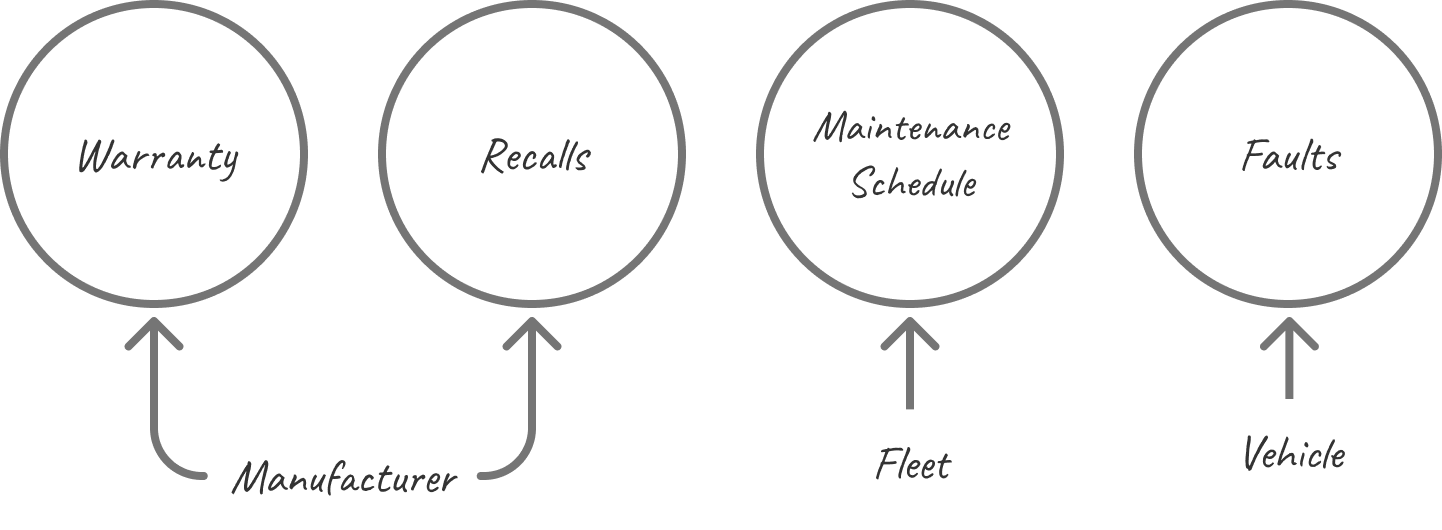
Warranty and recall signals are issued by the manufacturer. Warranty tracks when manufacturer or extended coverage expires: a missed expiry is a missed chance to get repairs covered at no cost. Recalls are safety or defect notices requiring specific repairs, and ignoring them creates legal liability.
Scheduled maintenance covers preventive service intervals (oil changes, filter replacements, inspections) based on mileage or time, configured by fleet admins. Missed intervals lead to preventable breakdowns.
Faults are diagnostic codes from the vehicle’s onboard computer (check engine, low oil pressure, brake warnings), sourced from telematics or a technician upload. The noisiest signal: they can fire and clear the same day, making them hard to act on with confidence.
Who I Needed to Design For
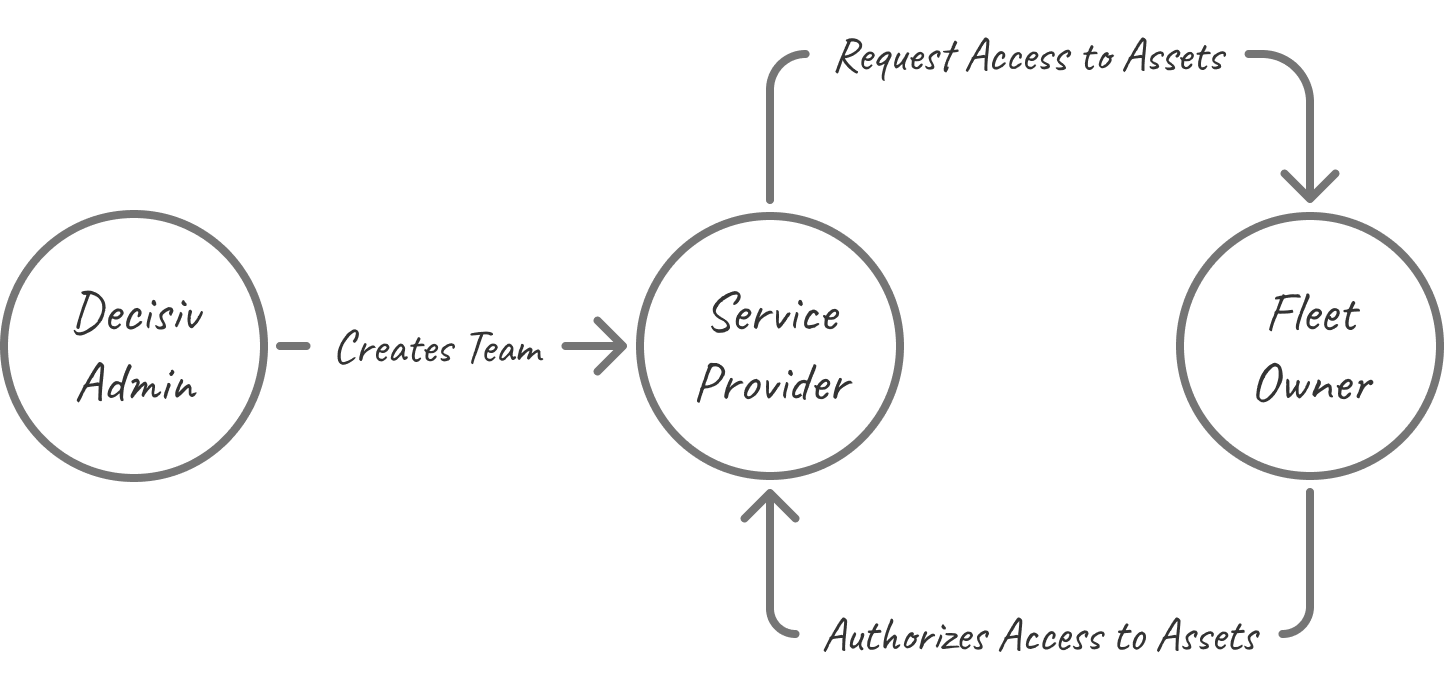
The main focus was service providers: service advisors and managers running maintenance contracts on behalf of fleet customers, responsible for triaging alerts and coordinating service daily. But two other personas had dedicated experiences that had to work before the main app could. A Decisiv admin had to create the team, assign permissions, and configure the integration with the provider’s existing Case environment. Once that was in place, service providers could invite their fleet owner customers and request authorization to manage their assets in Sentinel.
Information Architecture
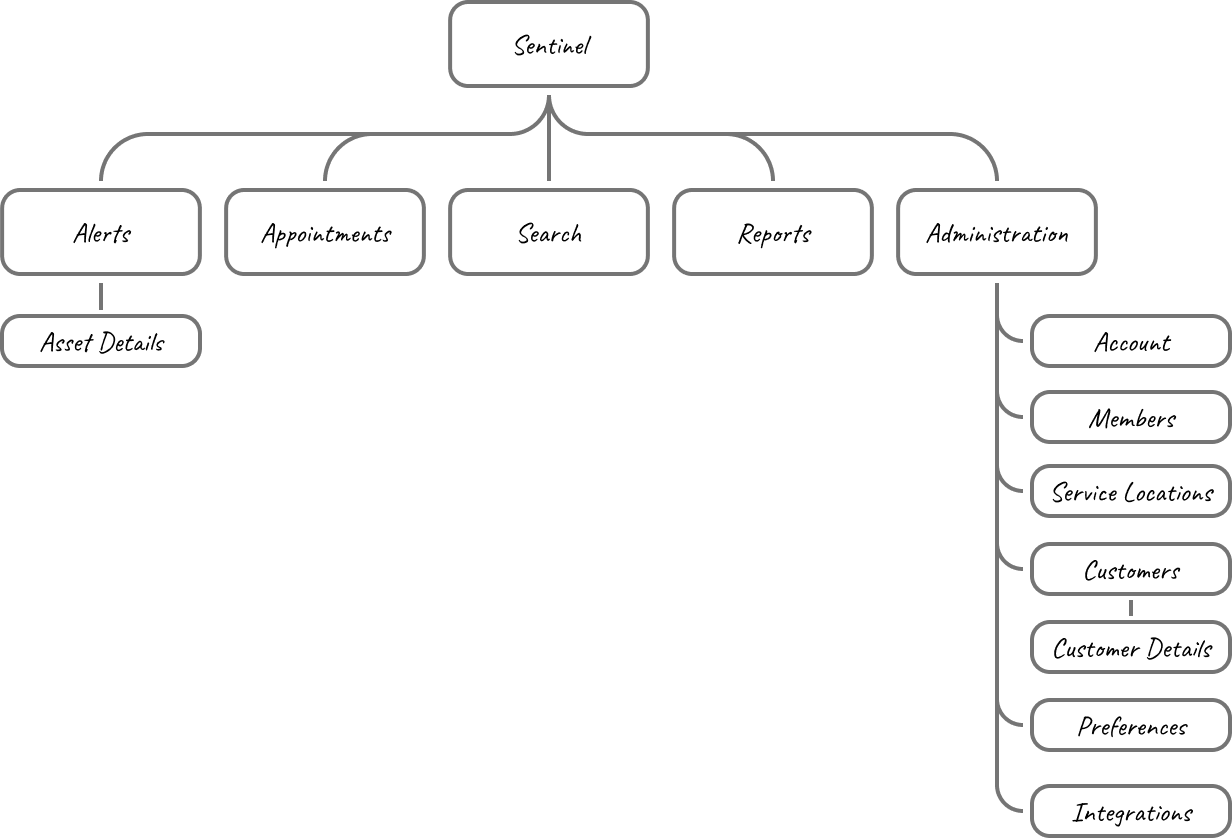
Sentinel was conceived as a standalone product from the start, part of a broader push at Decisiv to replace aging, hard-to-maintain legacy tools with smaller, focused applications rather than continue patching them. That call came from leadership before the project reached me, and I didn’t question it at the time: it lined up with where the company said it was headed.
The service provider experience was at the heart of the product. I defined the information architecture early to align the team on scope and sequencing. The core experience came first, with Admin and configurable alert criteria following in later releases. The product was built with KeyDS and designed as a foundation rather than a finished state.
Alerts
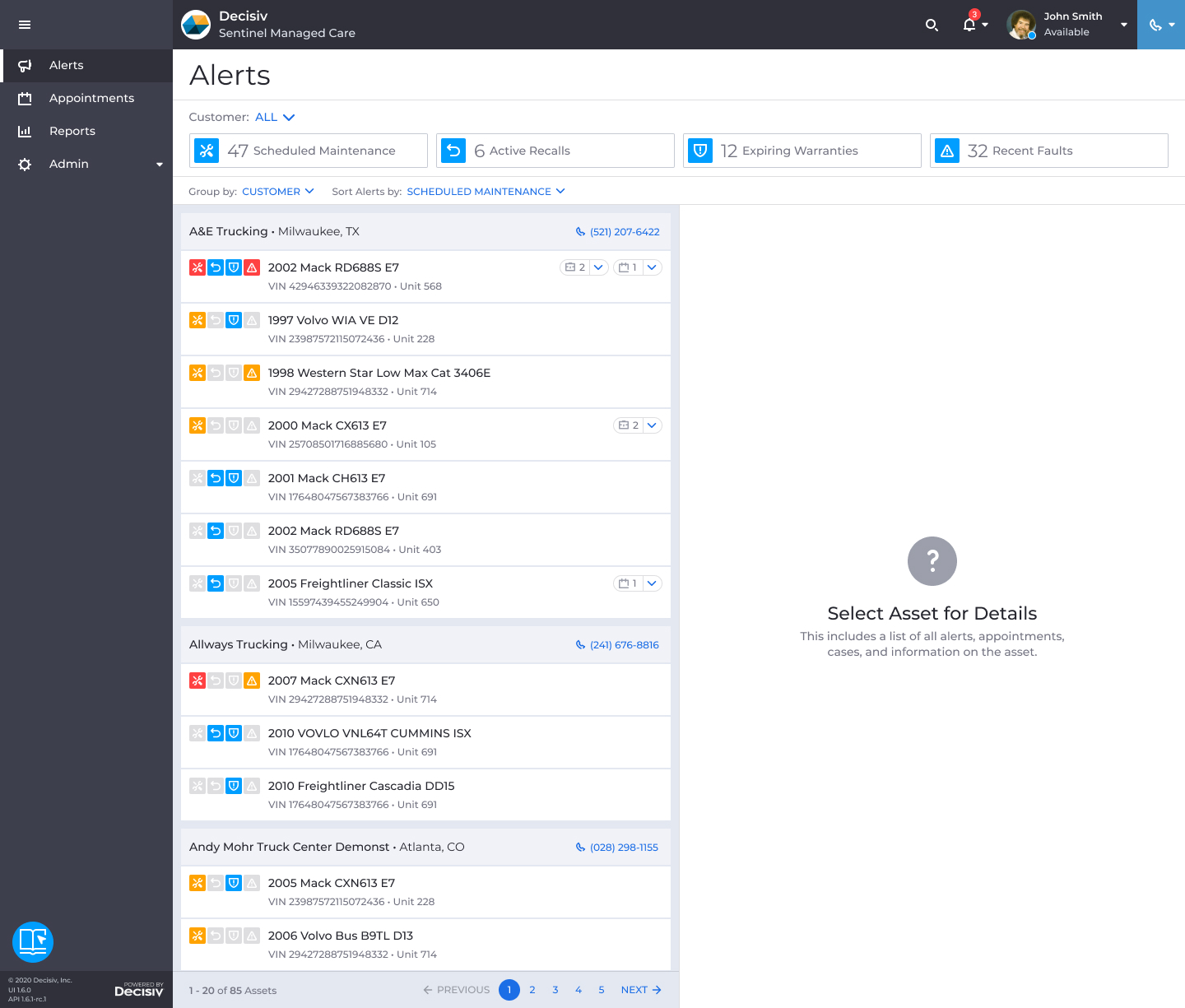
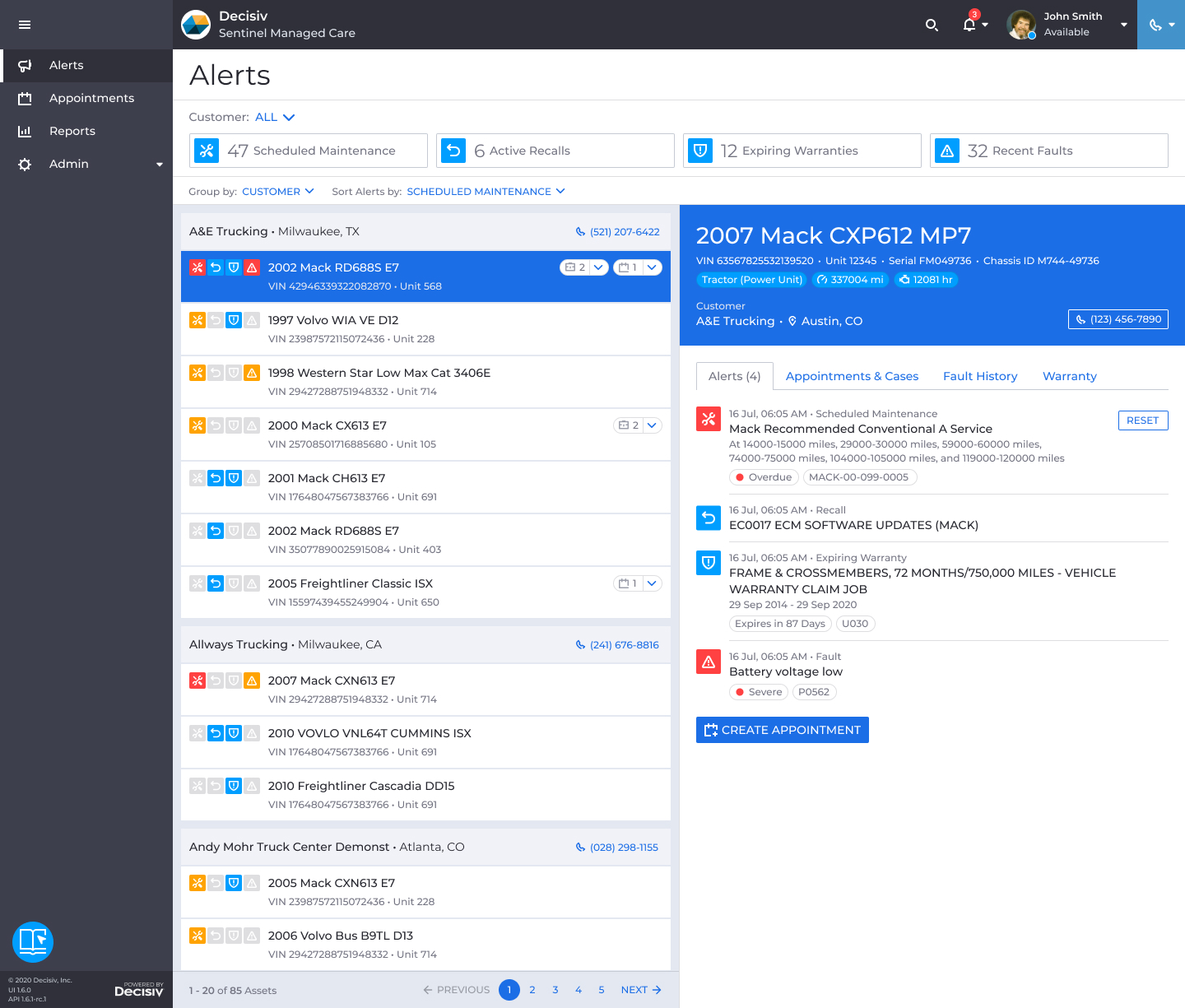
I designed the alerts page as Sentinel’s core view: a single list of every asset with an active alert, across all customers a team managed. Each alert type could be configured per team in Preferences. I assigned an icon to each type and color-coded by urgency: red for overdue or high-concern signals, orange for moderate, yellow for low, blue for informational. Since color alone wasn’t sufficient for accessibility, alert details were also surfaced through popovers.
A service provider managing hundreds of assets needed a way to work the list, not just look at it. I designed filter and sorting features, giving users enough control to prioritize without overwhelming them.
Clicking any asset opened a details panel with four tabs: active alerts, in-progress appointments and cases, fault history, and warranty information. Before Sentinel, pulling this picture together meant switching between systems.
Appointments
Sentinel identified the issue; the resolution lived in Case, Decisiv’s existing service management platform.
I made the path from alert to appointment as direct as possible. Clicking Create Appointment from the Asset details panel opened a draft with the asset, customer, and alert information already populated.
From there, advisors entered the asset location, picked a service provider from a map, set a requested date and time, and reviewed which alerts to include. Individual alerts could be deferred if the team wanted to hold off on a specific issue. On submission, I had the appointment automatically create a case in Case, with no duplicate entry and no manual handoff.
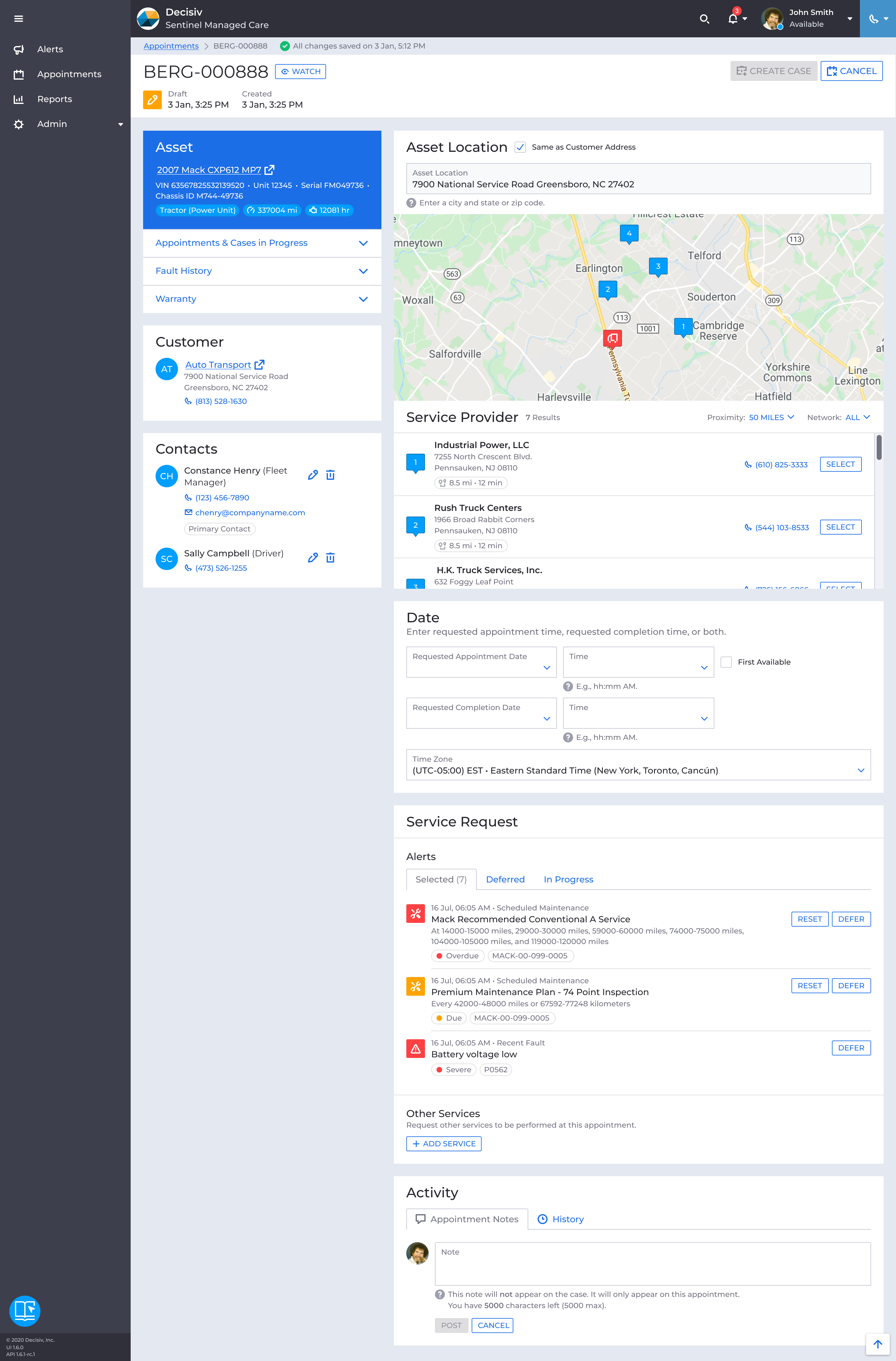
I originally aimed to let advisors book a confirmed time directly from Sentinel. Without integrating into service providers’ bay scheduling systems, that wasn’t possible. The best available solution was a requested appointment time and requested completion time, which the service provider would confirm on their end through Case.
Appointments list
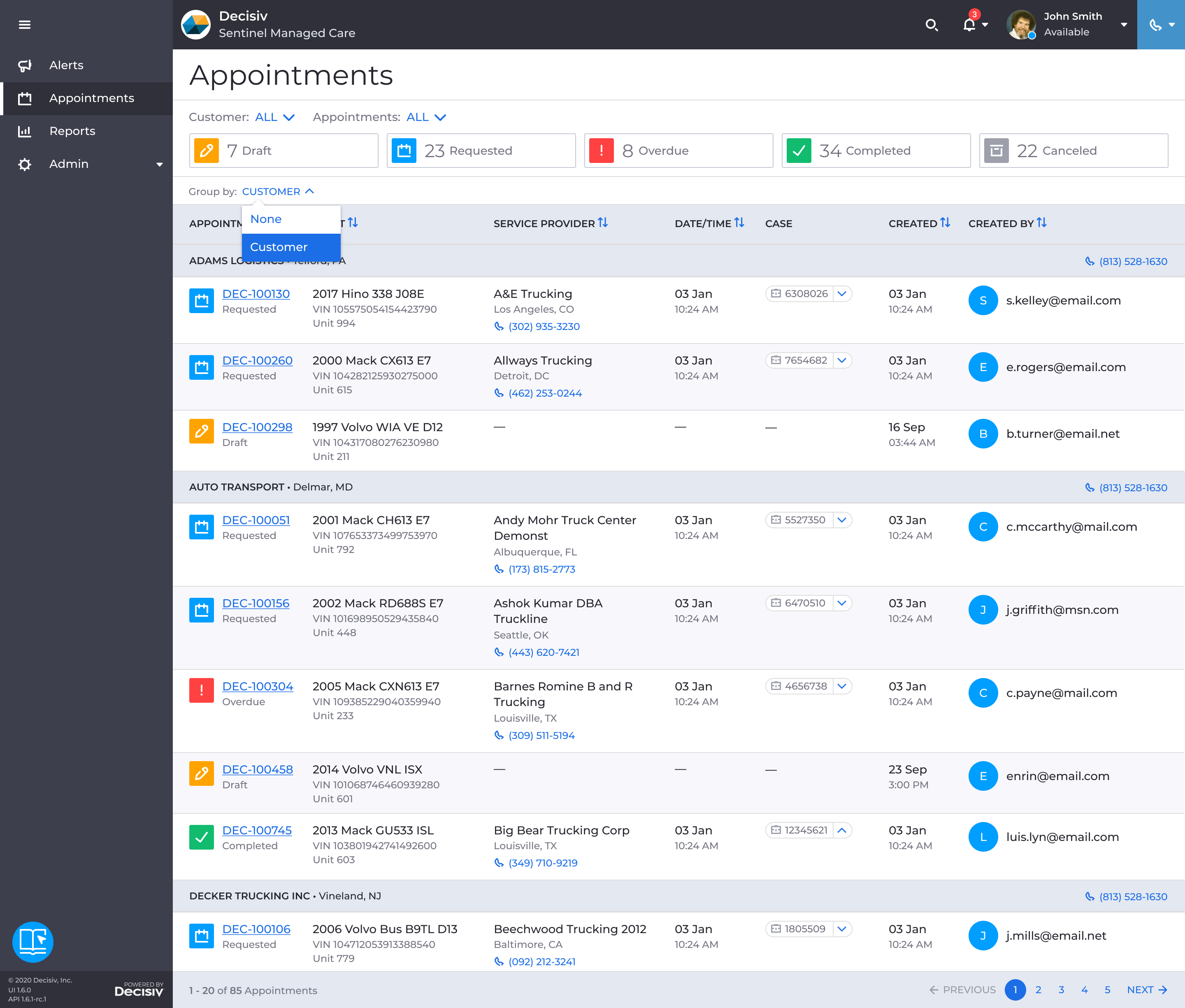
I designed the appointments list to give teams a single view of every appointment in the system. Appointments were grouped by customer, so advisors could quickly get up to speed before a customer call. Status was color-coded so advisors could scan all activity at a glance, and each appointment linked directly to its corresponding case in Case.
Search
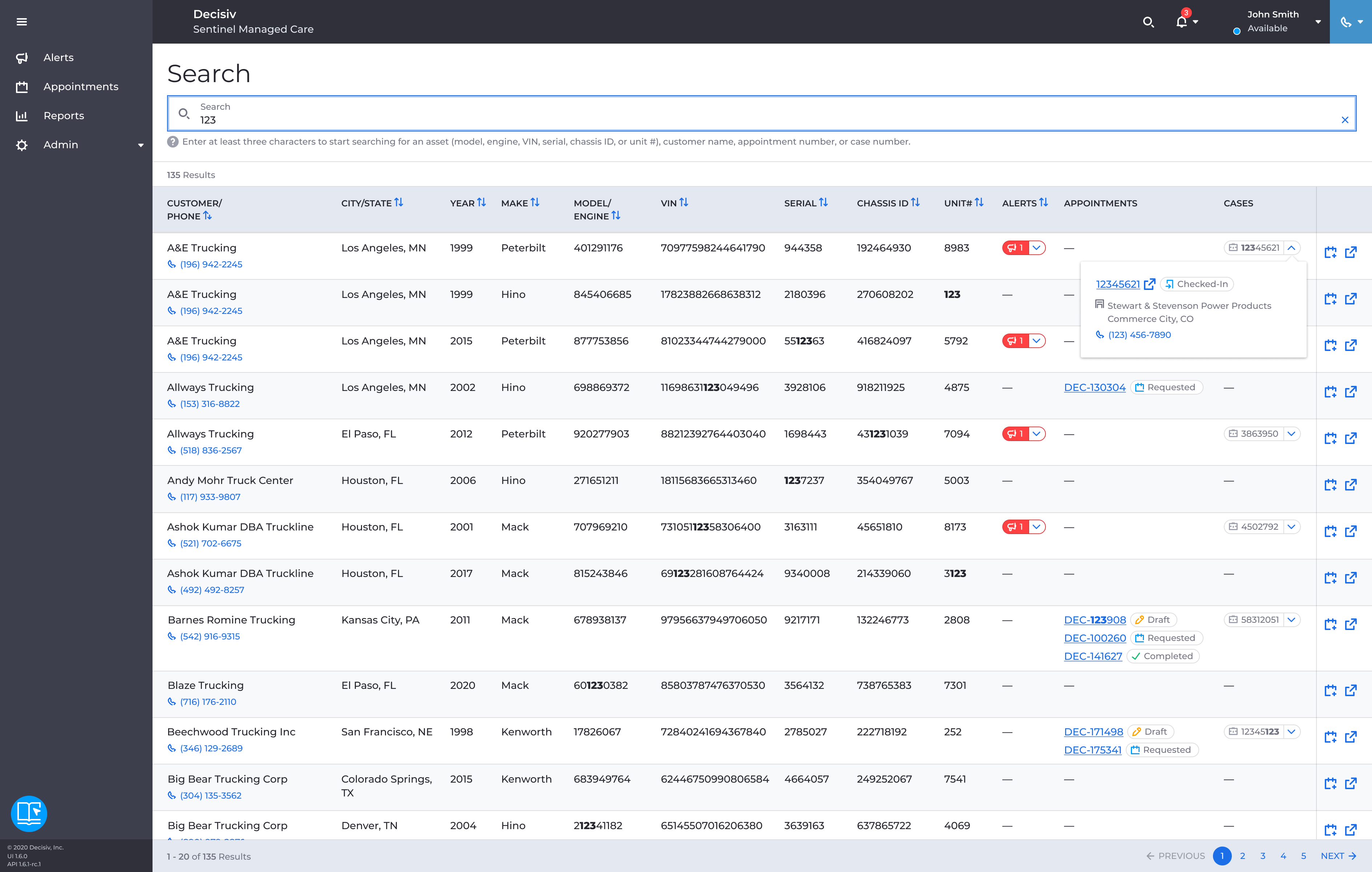
I added search so advisors could look up any asset across all their customers directly from the top navigation. It returned a full asset profile: VIN, unit number, mileage, engine hours, active alerts, and appointment history. For advisors who knew exactly which asset they needed, it was faster than working through the alerts list.
Because each asset surfaced so much data, the table could get wide. I made the action column sticky so it stayed visible while scrolling horizontally, letting advisors create an appointment or jump directly to that asset in Case without losing their place in the table.
Reports
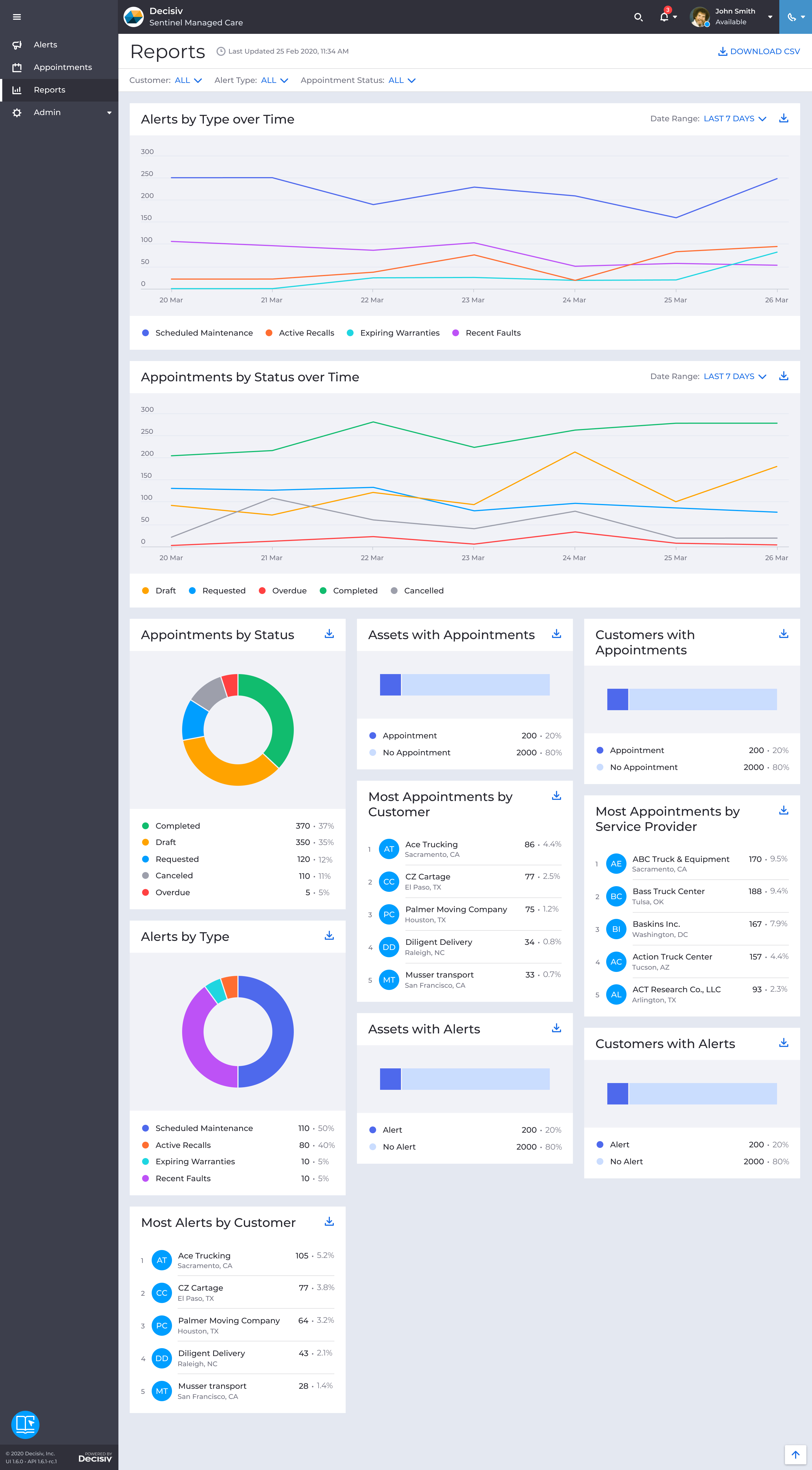
I designed 11 charts covering alert distribution, appointment volume and status over time, and breakdowns by customer, service provider, and asset. Reports could be filtered and downloaded as a CSV. I chose chart types to match what each report was communicating: pie charts for distribution, bar charts for two-category comparisons, line charts for trends, and rankings for highest-activity customers and assets.
For teams coming off spreadsheets, it was the first time they could see which customers had the most open alerts and which assets kept generating repeat appointments. It was also the first time they knew whether the operation was ahead of problems or just reacting to them.
Admin
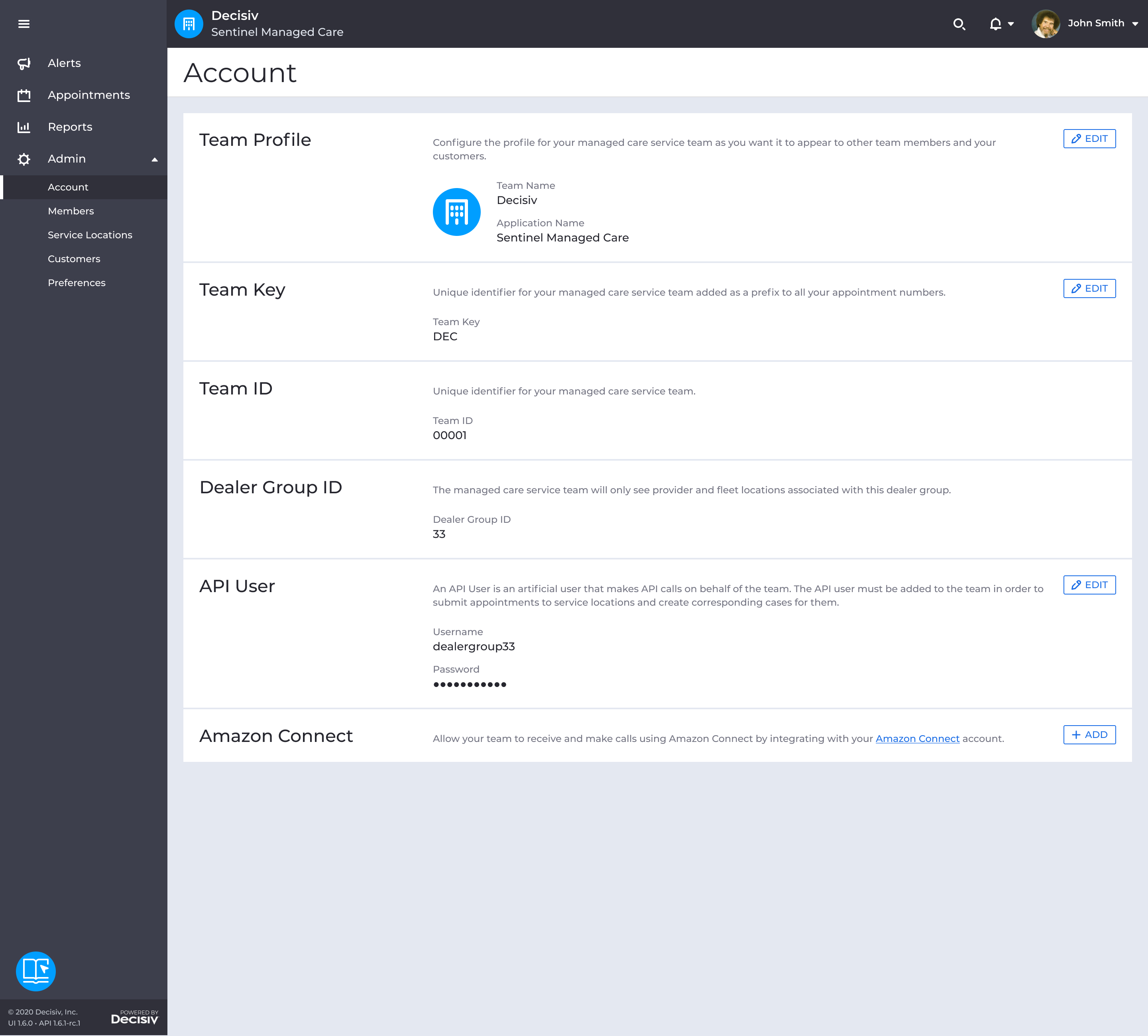
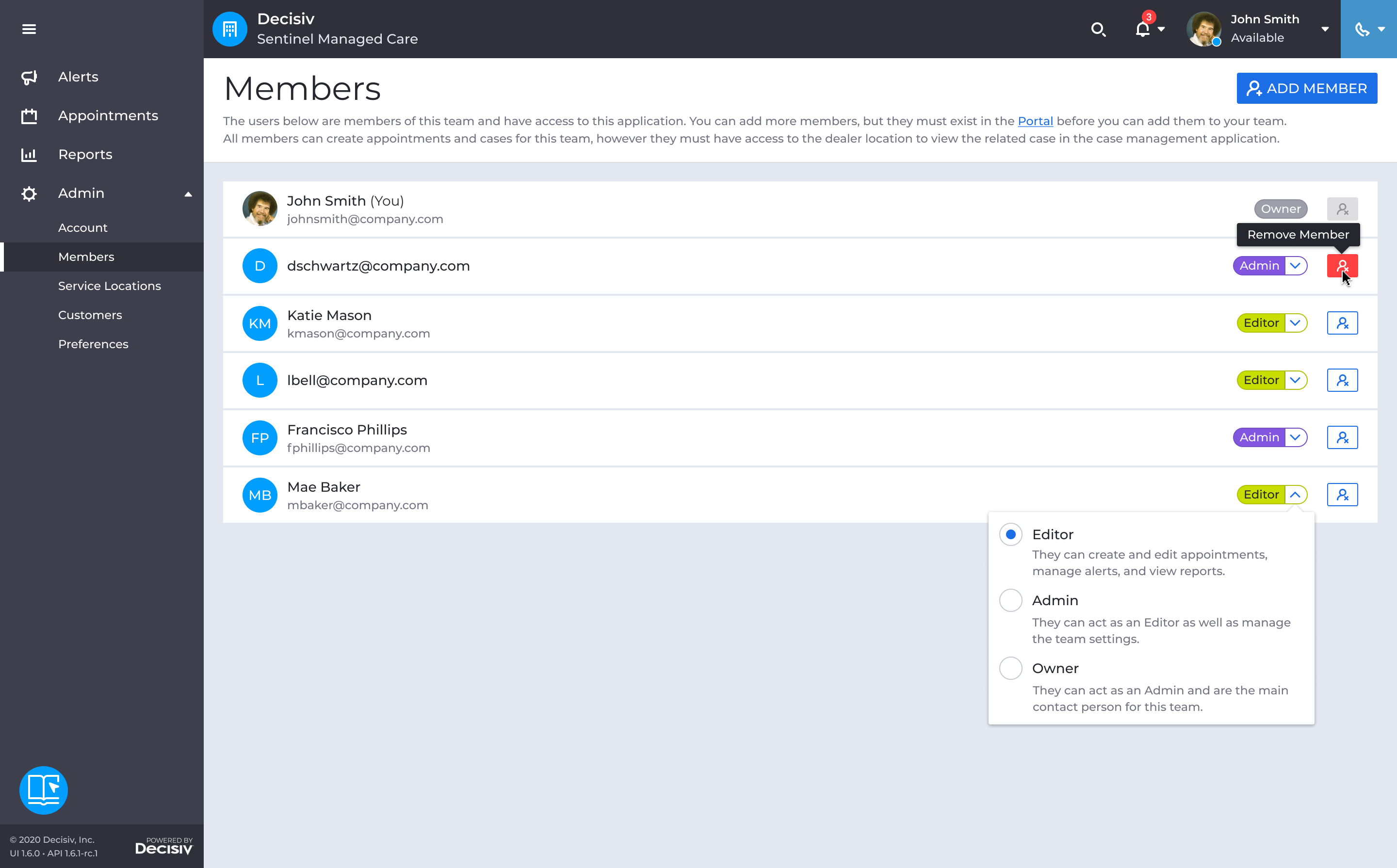
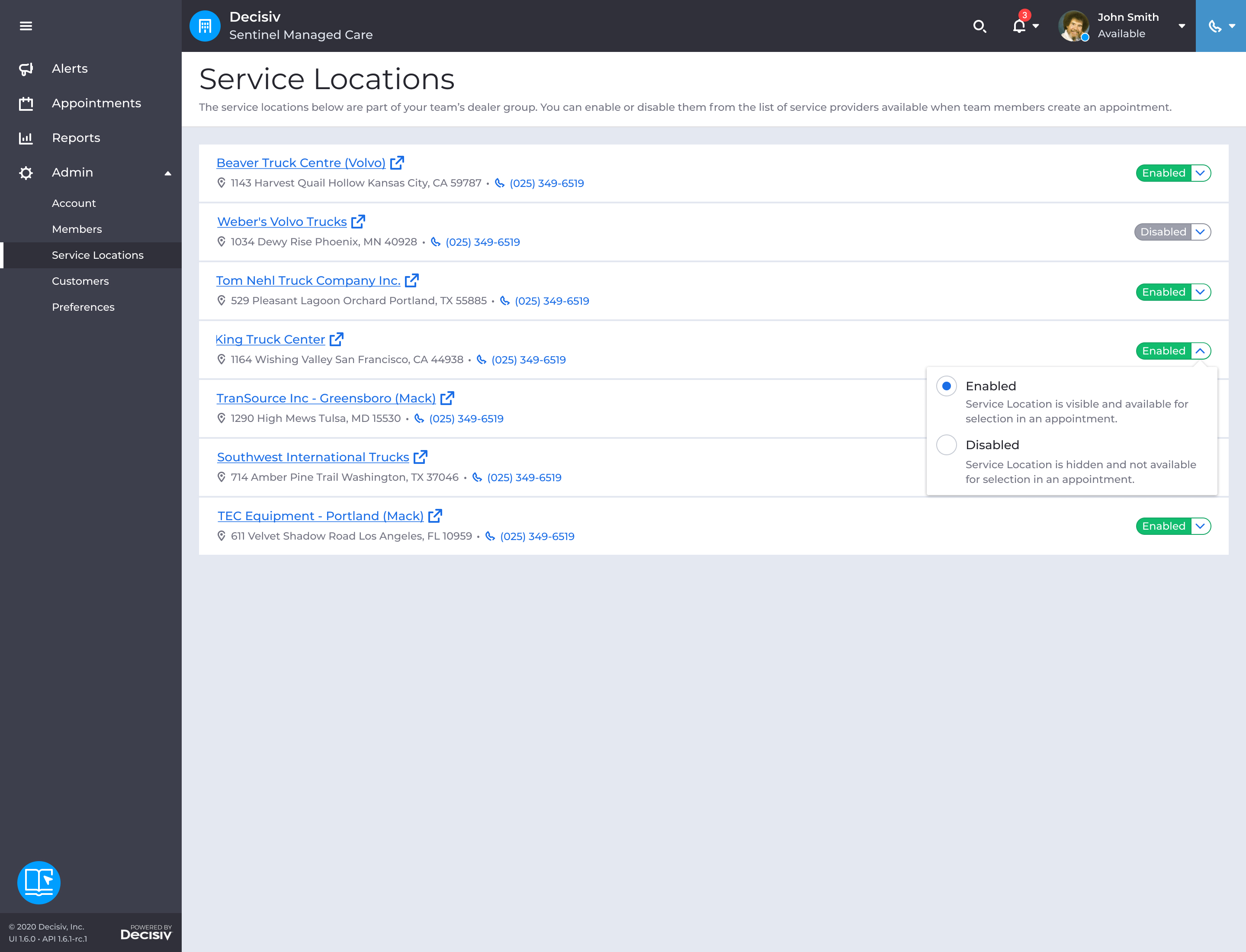
I designed the Admin area to give team owners ongoing control over how Sentinel was configured. I built the pages as modular layouts, so adding new configuration options as the product grew was straightforward.
Account, Members & Service Locations
I designed three areas: Account, to let admins manage the team’s profile and branding. Members, to add users and assign roles. And Service Locations, to control which shops were available when creating appointments.
Customers
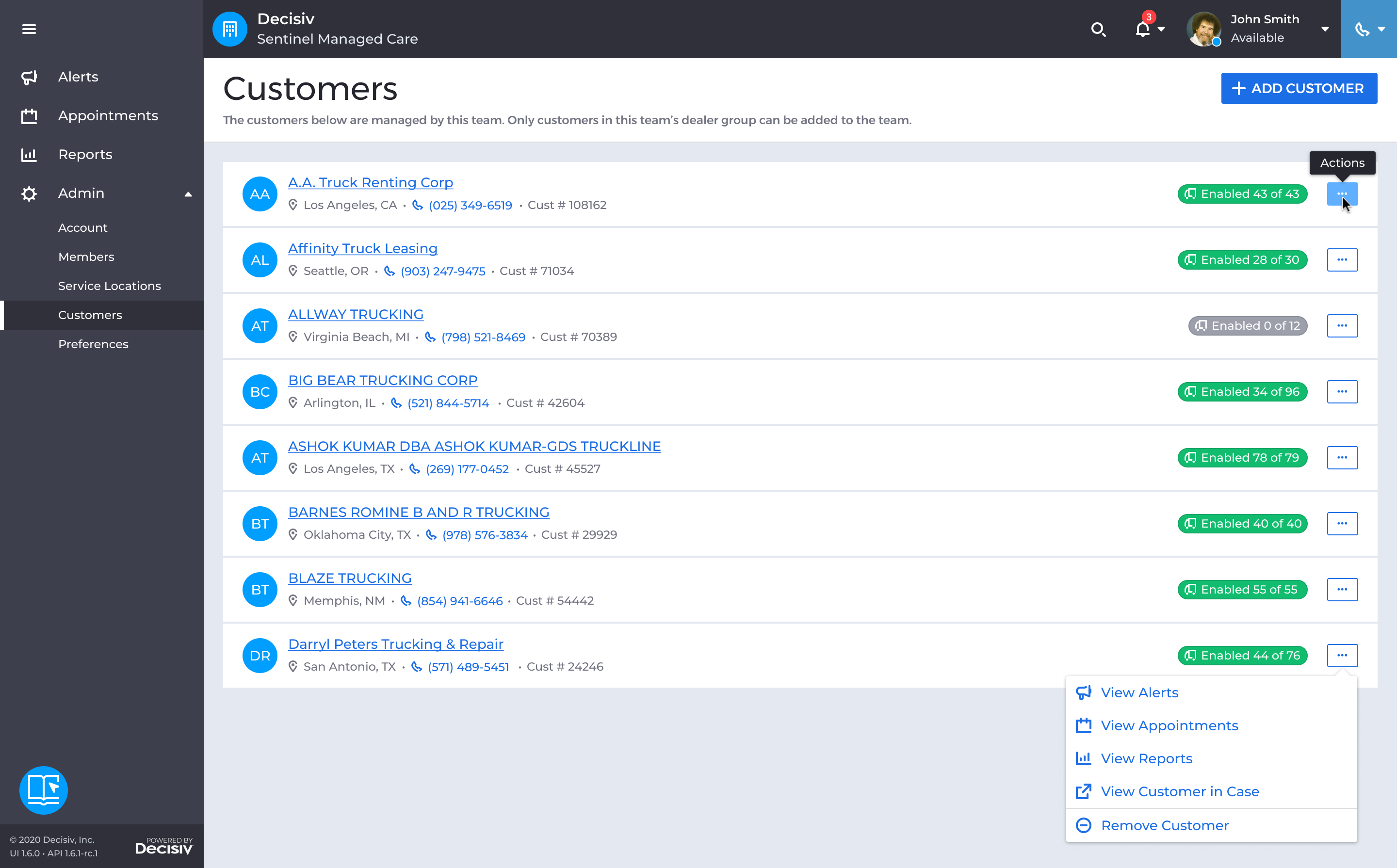
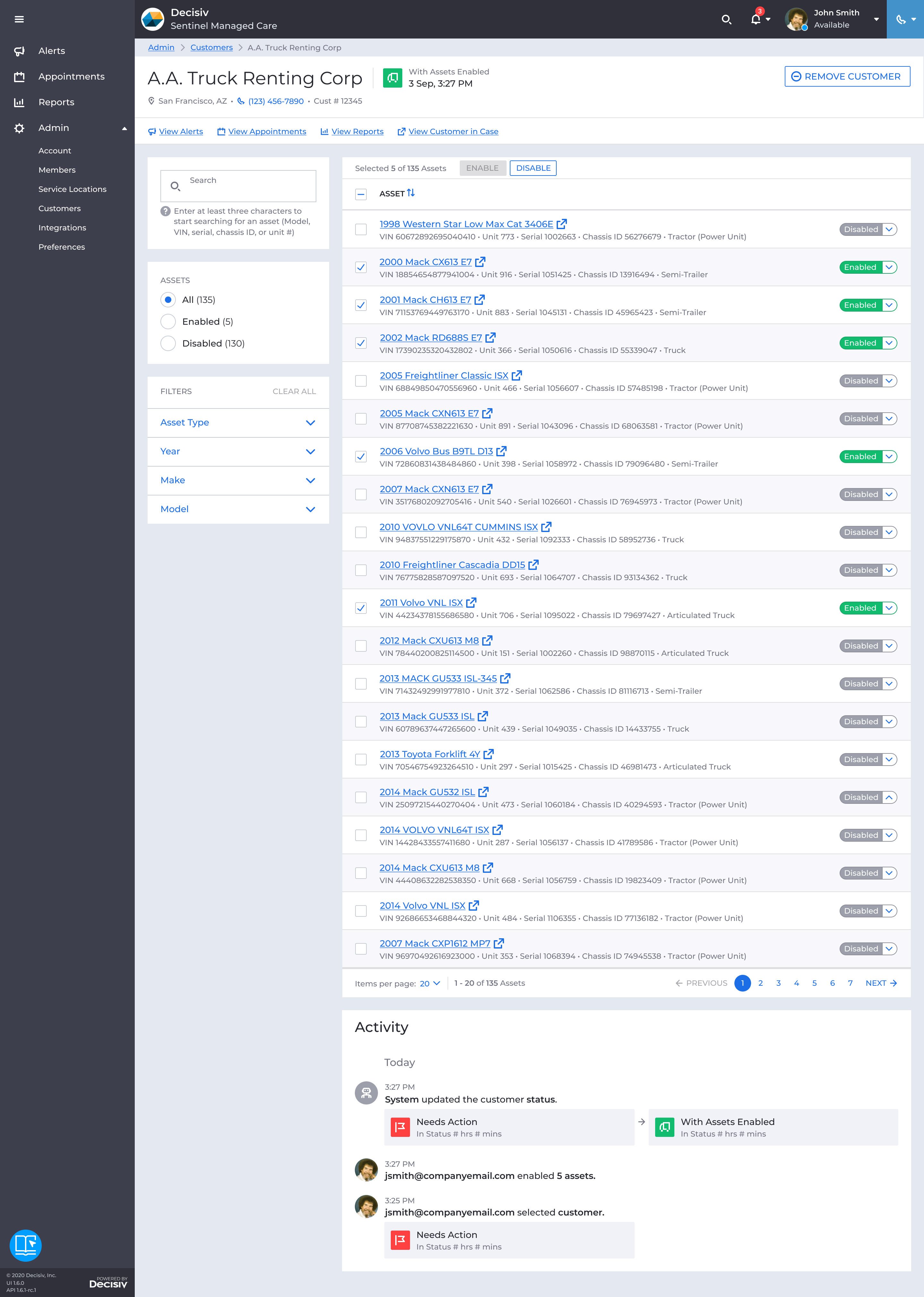
I designed Customers as the central list of managed fleets. Each customer had a detail page showing their assets, whether each was authorized for managed care, and a running activity log.
Preferences
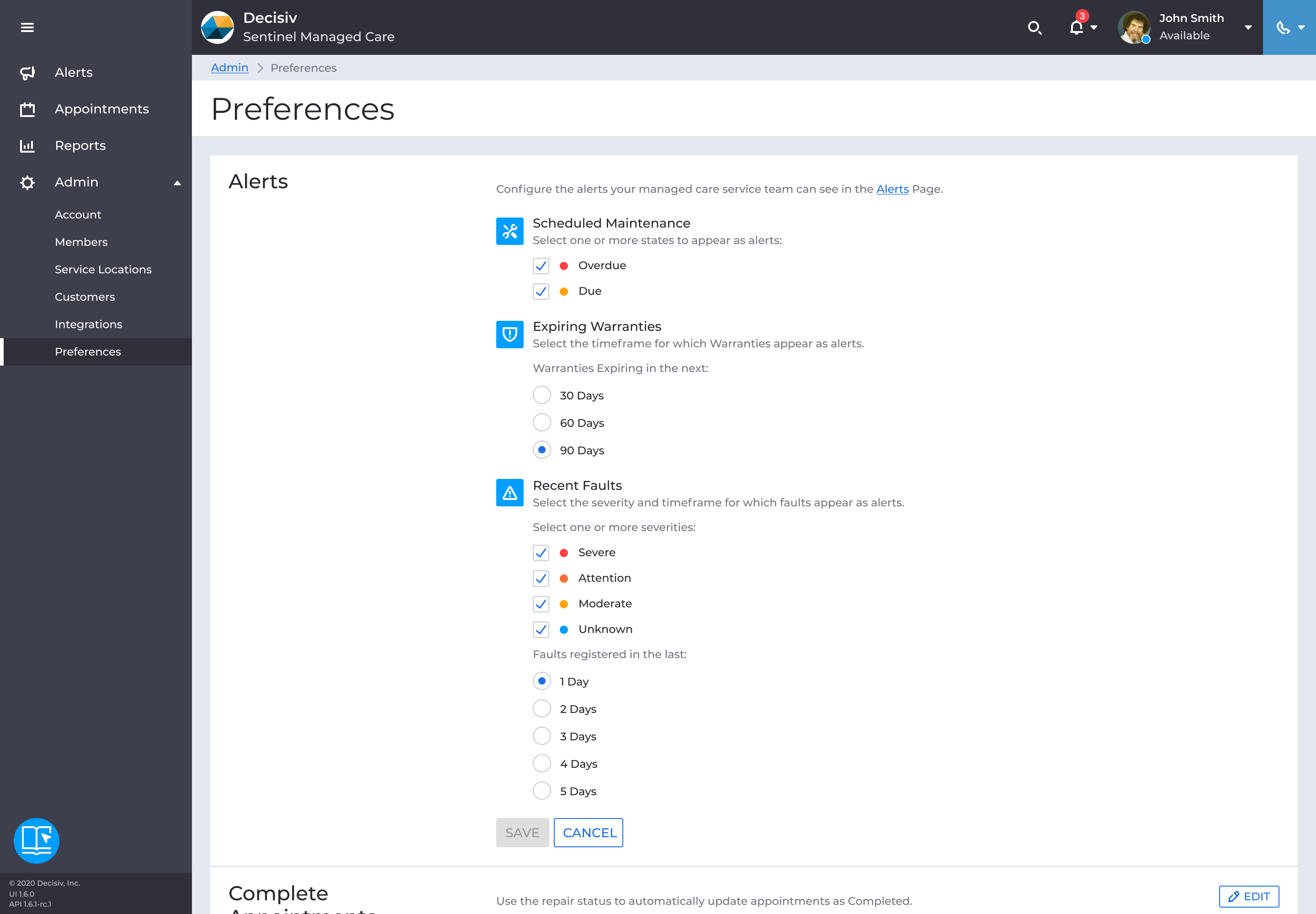
Product wanted teams to have authorship over which signals they considered actionable, so I designed configuration for the types, severity levels, and timeframes of alerts admins wanted surfaced. Scheduled maintenance split into overdue and due. Faults were filtered by recency and severity tiers. Warranties surfaced at configurable windows before expiration.
Setup checklist
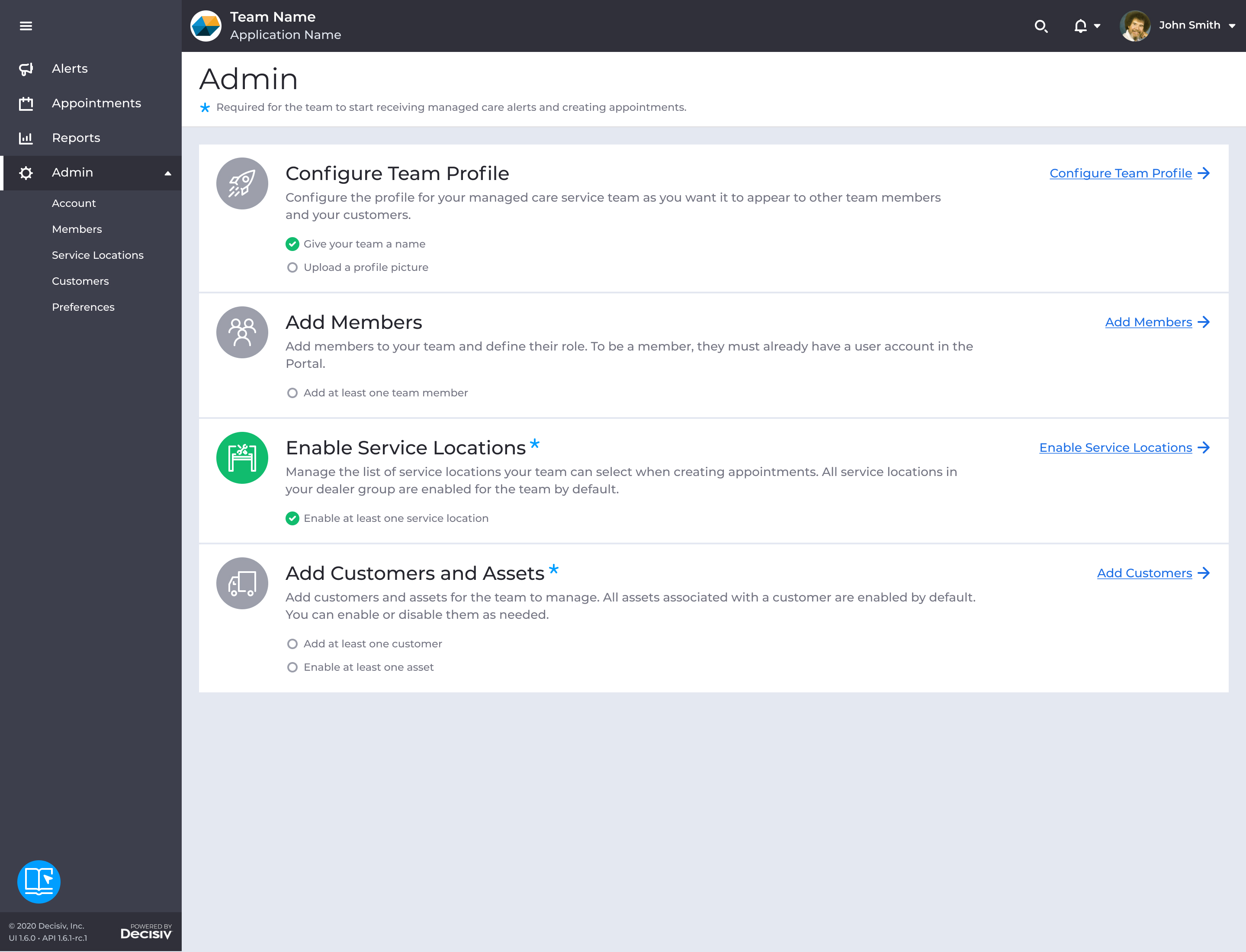
I designed a checklist to guide admins through the initial configuration. Each item linked directly to the corresponding settings page, and sections turned green once all substeps were complete. I considered more elaborate onboarding experiences, but the checklist was a low-cost solution that made the dependencies visible and gave admins a clear path to get the team operational.
What Beta Revealed
I worked with a researcher to plan the beta: moderated interviews and structured feedback sessions with a small group of service provider participants, starting in late 2020. Users found the product easy to navigate, and core tasks like looking up assets and creating appointments worked well.
"I think it's great for scheduling the appointments and creating the cases before the unit gets here"
But usability wasn’t translating into adoption, because users didn’t fully trust the alert data yet. Sentinel pulled from multiple sources (telematics, maintenance schedules, fault data from Case), and data maturity varied by customer, which meant some alerts didn’t always match what users expected to see.
"How long does it take to drop off? Is it based on time or completion? I know I don't have 14 faults"
Users needed something we hadn’t built yet: accountability for the signal itself. The research distilled what made a good alert: current, true, with a clear source, and updatable.
I went on parental leave shortly after, and another designer carried Sentinel forward from there.
Impact
Sentinel shipped and was adopted by multiple service providers managing large fleet portfolios. By the time I returned, the team was reporting earlier intervention in maintenance cycles and more predictable scheduling, the reactive-to-preventive shift the beta had been aiming for.
But getting organizations to change how they operated remained a challenge. Users liked the product, they just didn’t know where it fit in their existing workflows.
Looking back
Building Sentinel as a standalone tool fit Decisiv’s broader modernization strategy, but a few years in, adoption told a different story: users were still living in legacy, because the pace of launching enough standalone apps to actually replace it never caught up. An alert view inside Case, where service providers already spent their time, might have achieved the same outcomes with less of an adoption tax. What it did prove was that Decisiv could still ship something new outside the legacy platform. That mattered internally as much as what shipped.
Other Case Studies