04Problem reframing
Updating estimate charges
Service providers using Decisiv's Case platform could update charges, but not with any confidence: values were scattered across surfaces, overrides were permanent and invisible, and advisors were making irreversible edits without understanding what they were giving up. A reskin was on the roadmap.
As the sole designer working with a PM, subject matter experts, a researcher, and engineering, I identified the structural problems first, made the case for a proper redesign before touching any UI, mapped the charge business rules with subject matter experts, explored three interaction models, and tested the chosen direction in moderated usability sessions.
What drew me to this was the user advocacy part: making the case for something better without derailing the original scope or spending resources the team didn't have.
Some details in this case study have been omitted to protect confidential information under an NDA. The scope and impact of the work are accurately represented.
Impact at a Glance
1 entry point
Replaced scattered charge controls across the Operations Table, totals summary, and operation-level pages
Migration unblocked
Charge workflow shipped with the React/KeyDS Operations Table rather than carrying the old fragmented experience forward
Carla has a rare ability to cut through complexity, identifying the core questions in any design problem and rapidly synthesizing them into elegant solutions.
The Request to Reskin
The Operations Table, where each repair operation lists its associated labor and parts, was mid-migration to React and KeyDS. The section below it was not. It included the totals summary, where charges like shop supplies, freight, taxes, core charges, and hazardous waste fees appeared, and a set of case-level actions. Legacy and new code weren’t playing well together, and Engineering came to design with a simple ask: reskin that section to match. Before agreeing to that, I went to look at how the current experience actually worked. Several inconsistencies caught my attention.
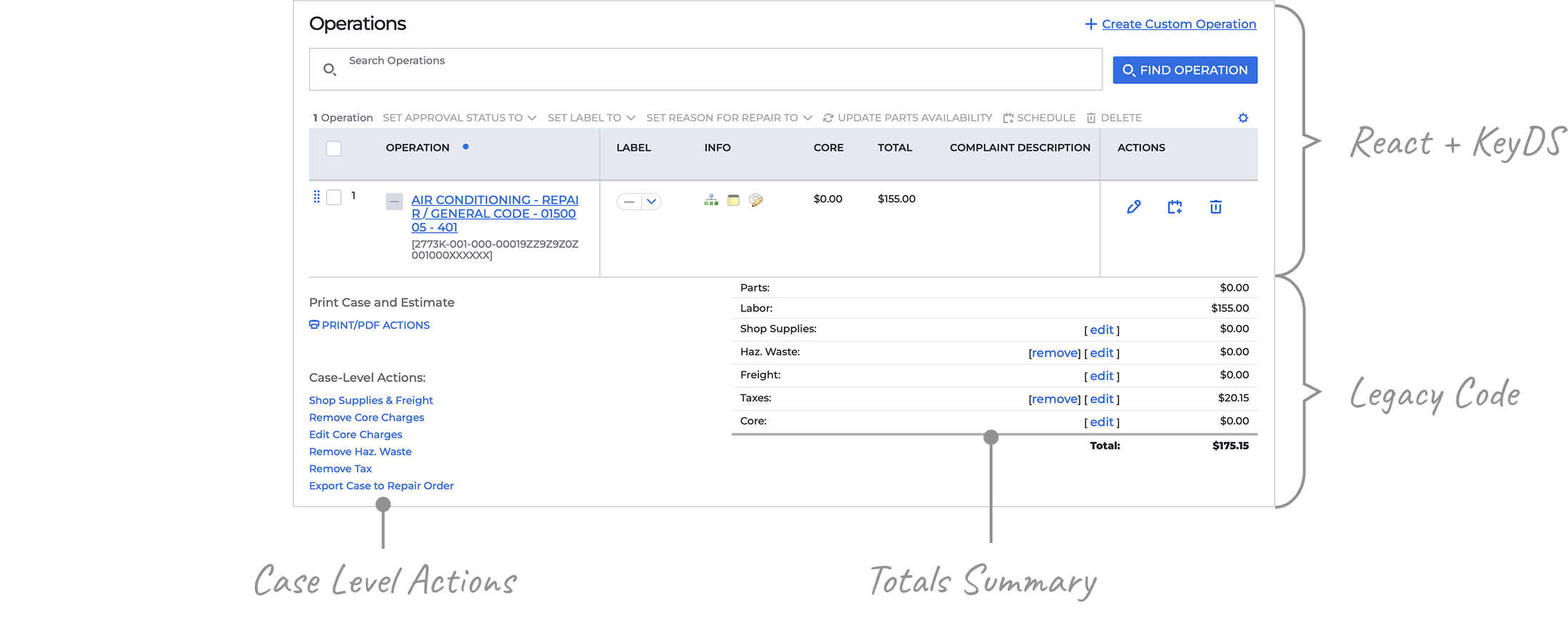
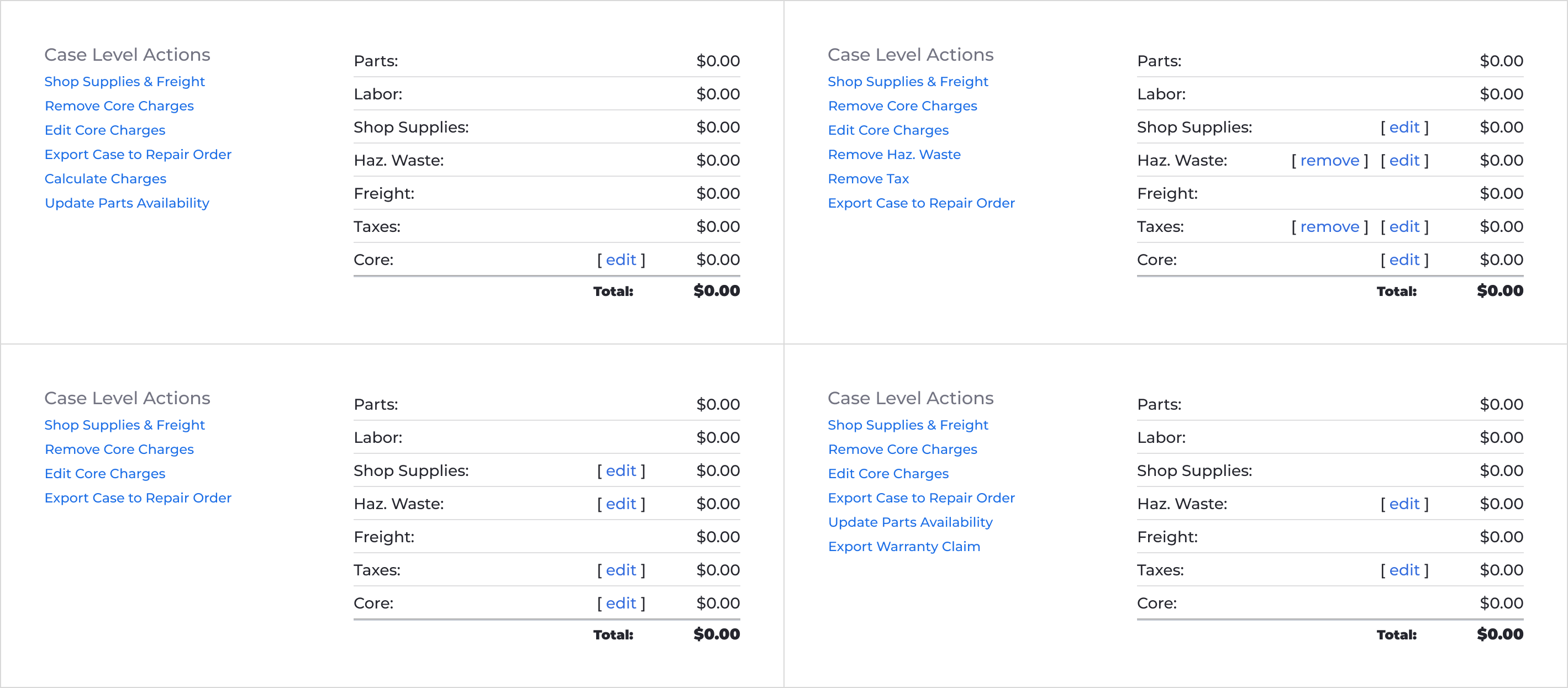
Inconsistent trigger placement
Triggers to edit or remove charges always appeared in case-level actions, and sometimes in the totals summary as well. The platform was maintaining multiple versions of the same workflow, and the variations weren’t driven by any logic I could point to.
The edit pages
For all that fragmentation, the actual editing happened in just two pages.
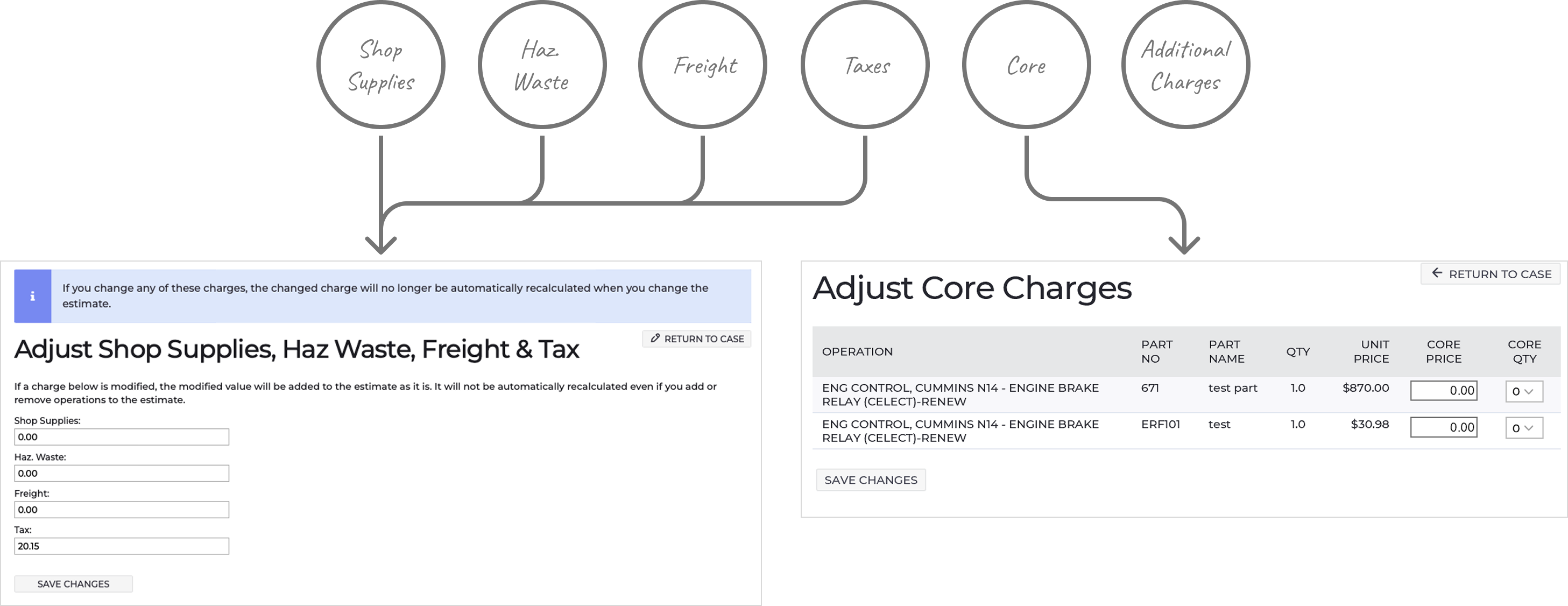
The edit triggers for shop supplies, hazardous waste, freight, and taxes all led to the same page. A warning informed service advisors that overriding any value would stop the automatic process behind it. But the page had no way to show whether a value had already been changed. You couldn’t tell if a number came from a live calculation or a manual edit. And once a value was changed, there was no way back. Service advisors were making permanent edits with no visibility into what they were changing or what they were giving up.
The fields that appeared on the page varied but the title didn’t. And the case-level trigger was always labeled “Shop Supplies & Freight,” regardless of which charges were actually on the other side. If a service advisor needed to update hazardous waste or taxes, there might be nothing in case-level actions to tell them those were even editable.
Core charges, configured at the operation level, had a dedicated page that aggregated all of them across the case.
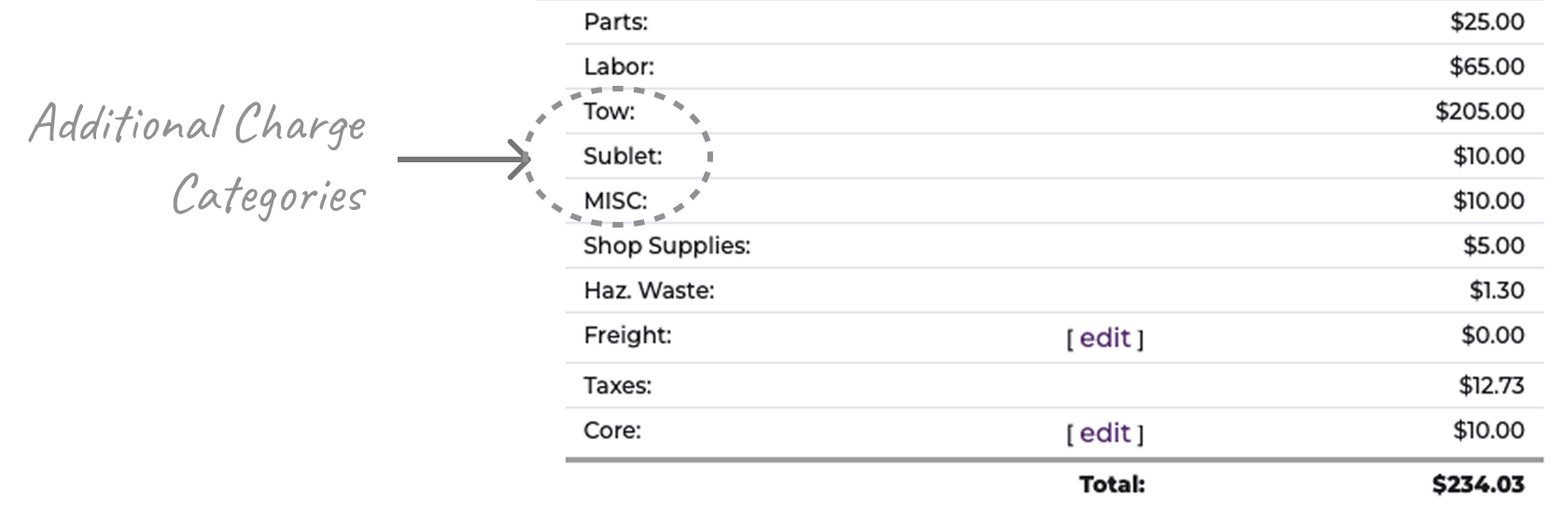
Additional charges had no edit trigger
Decisiv supported additional charge categories, configured by admins. Additional charge categories were selected at the operation level, and when that happened the corresponding category appeared in the summary. If not, it didn’t. But unlike core charges, which were also configured at the operation level, additional charge categories couldn’t be edited from the case page at all. If a service advisor needed to update the charge, they had to open each operation individually and adjust values.
Making the Case for a Redesign
I brought the findings to the PM. A reskin would unblock the migration and make the totals summary match the Operations Table visually, but the fragmented workflow underneath would stay intact. NPS comments showed that users thought estimates were frequently wrong, that there was no way to handle tax-exempt cases, and that they wanted granular control the interface didn’t support. That made it hard to disregard, and the PM agreed it was worth exploring. I got the space to dig deeper.
Mapping the Charge Logic
I worked with the PM and internal subject matter experts to map the charge types, their visibility rules, and the logic behind how they behaved. The charge engine was more complex than the UI made it appear. The same charge could behave very differently depending on dealer configuration, business rules, and case state, or not be available at all.
Once I understood how the charge engine actually behaved, it was clear the fragmentation was a UI problem and the underlying logic didn’t need changing. We agreed on an approach: I’d do the design exploration upfront, then bring it to engineering to size the effort before anyone committed to building it.
Exploring Directions
I started my exploration with two assumptions: charge management should be triggered from the totals summary, and users shouldn’t need to leave the case page to manage charges. The dedicated edit pages had to go. So did the charge controls in case-level actions.
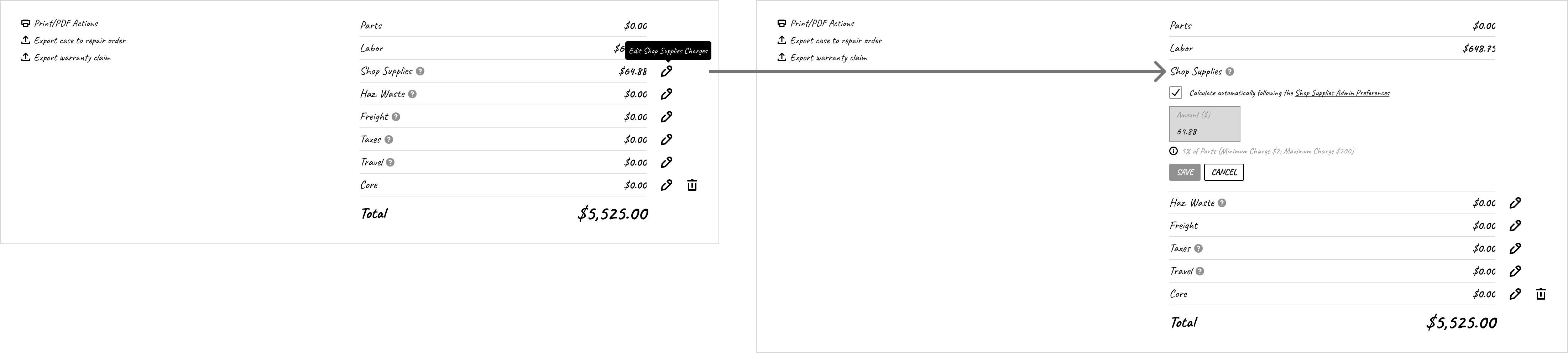
Inline editing?
Inline editing had precedent; many fields on the page already worked that way. But it raised questions. How could the UI communicate calculation failures, imported values, and overrides without crowding the totals summary? And how would it handle something as complex as core charges? What happened if someone edited a value and navigated away without saving? Did users need to see how a change affected the total before committing to it? Together, they pointed toward a more contained surface where behavior could be controlled.
One modal or many?
I explored two approaches: one where each charge had its own focused modal, and one that consolidated all charges into a single modal. The per-charge approach was simpler in isolation, but it preserved the fragmented mental model. Service providers would still open, save, and close multiple times to prepare a single estimate, with multiple calls to the external system. The consolidated approach addressed that directly: one surface, one save, one system update. The risk was fitting several charge types, states, and behaviors into one modal without it becoming overwhelming.
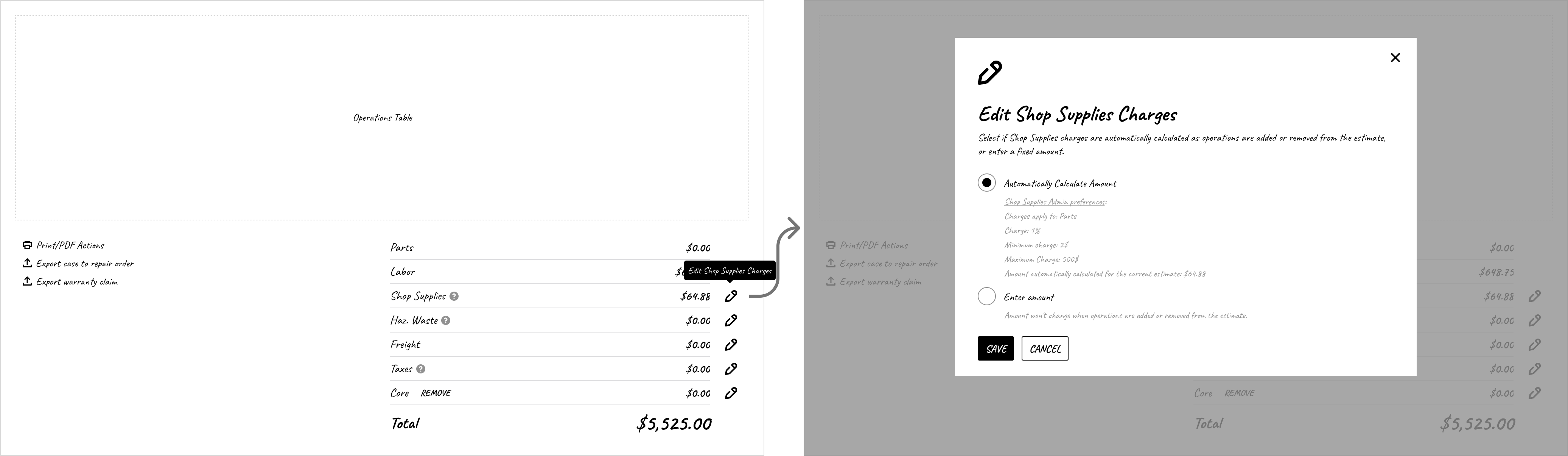
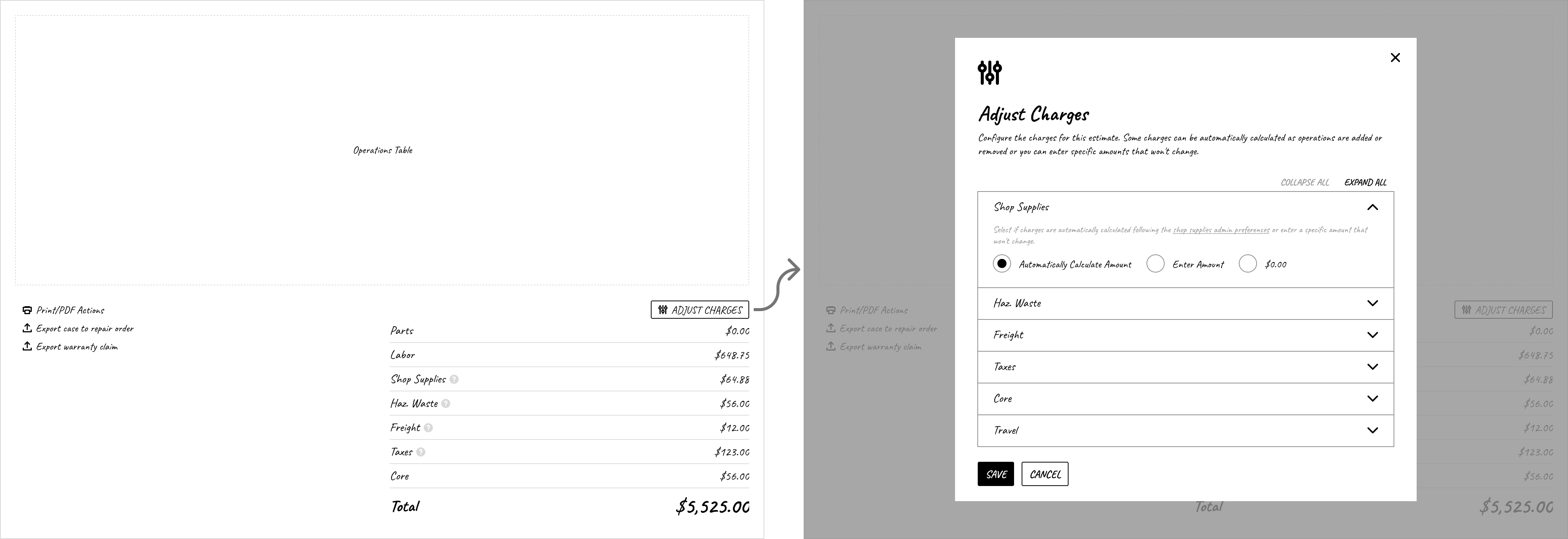
I presented the options to the PM and subject matter experts. We chose the consolidated modal because it gave service providers a single place to see and manage all charges for the first time, without requiring changes to the underlying charge logic.
Refining the Approach
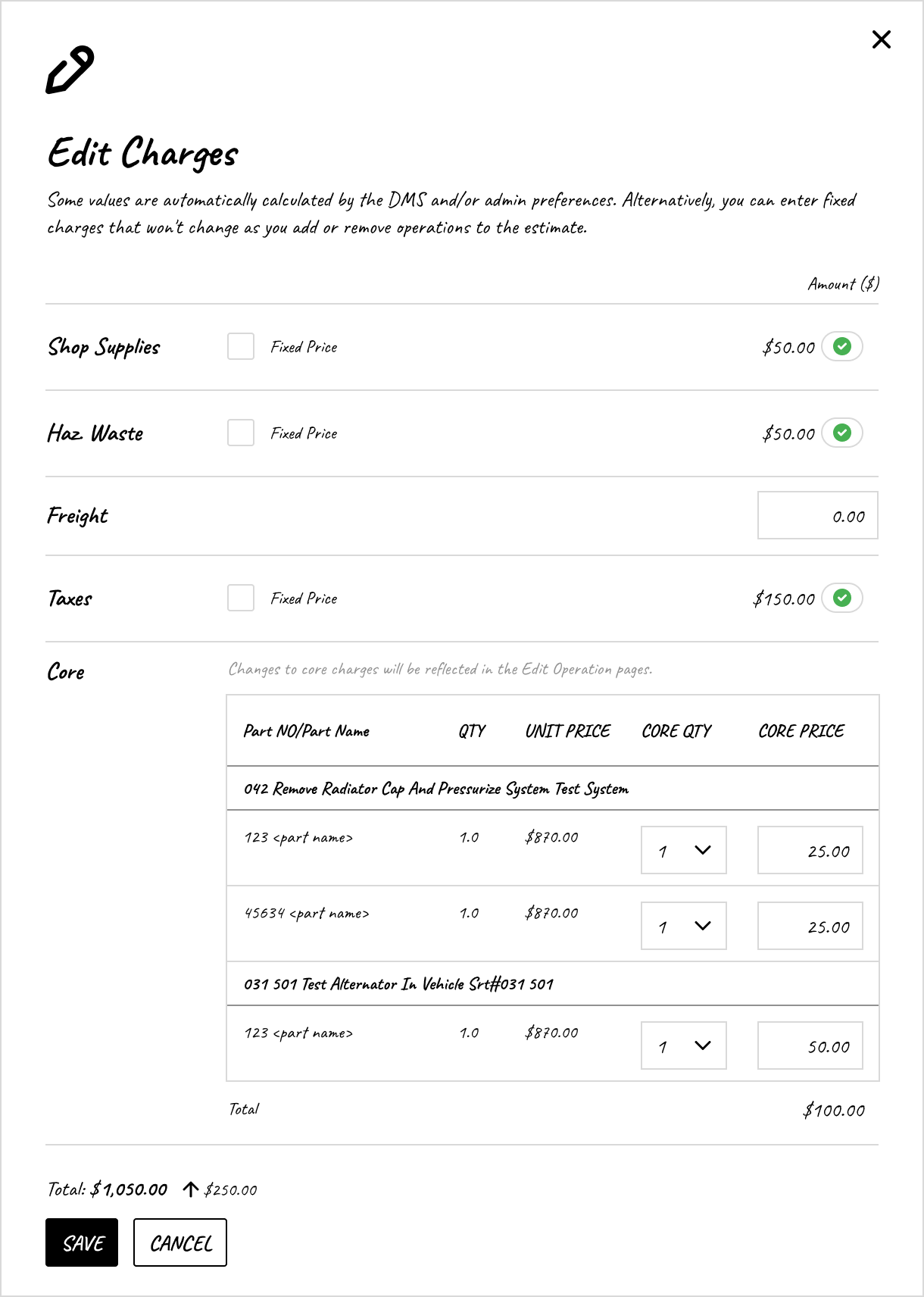
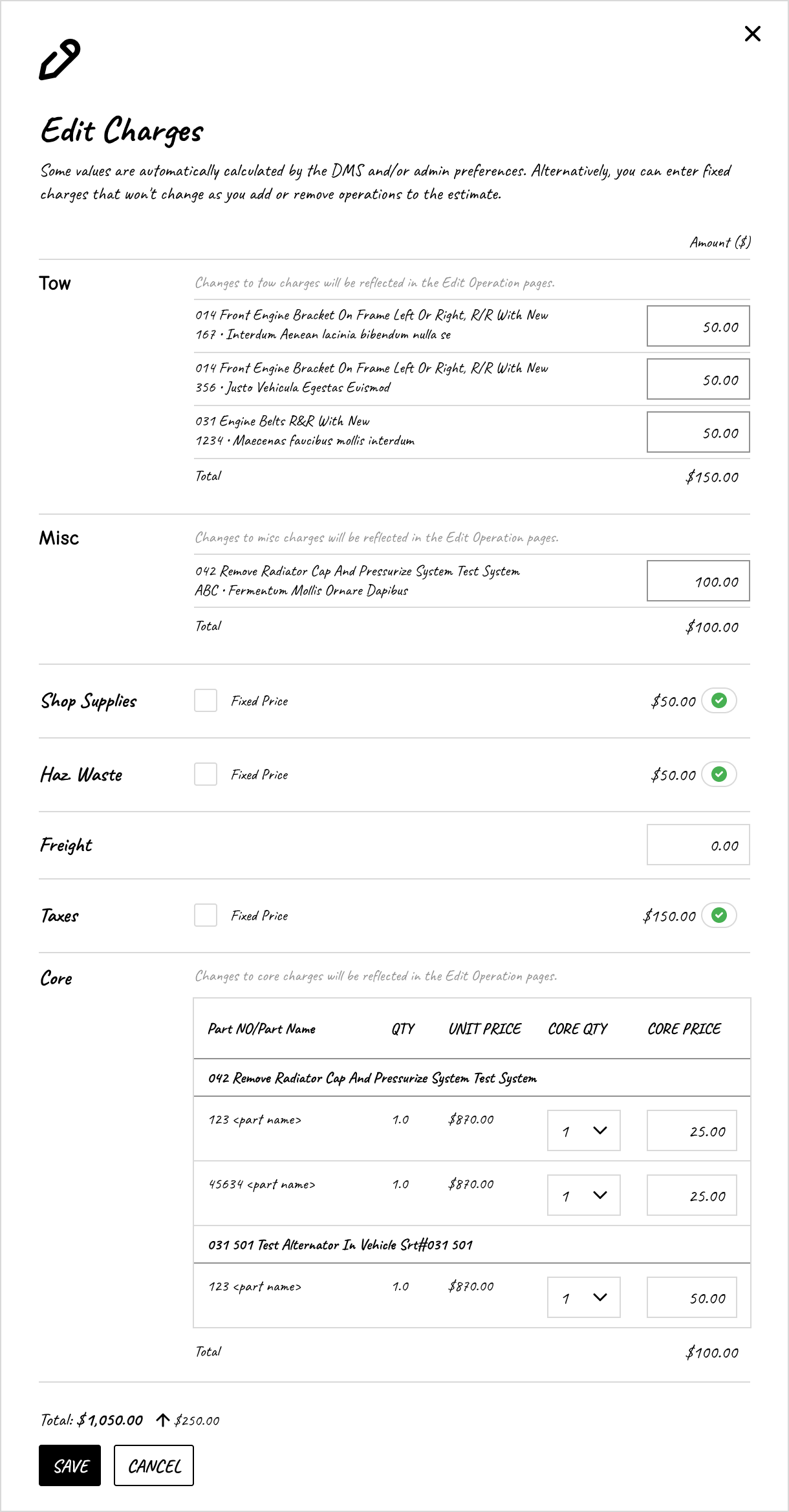
I built a wireframe covering the full flow for dealers with and without business system integration: the triggers to edit and calculate charges, the modal with all charge categories and states, a live totals summary, and success and error states after saving.
Structuring the modal
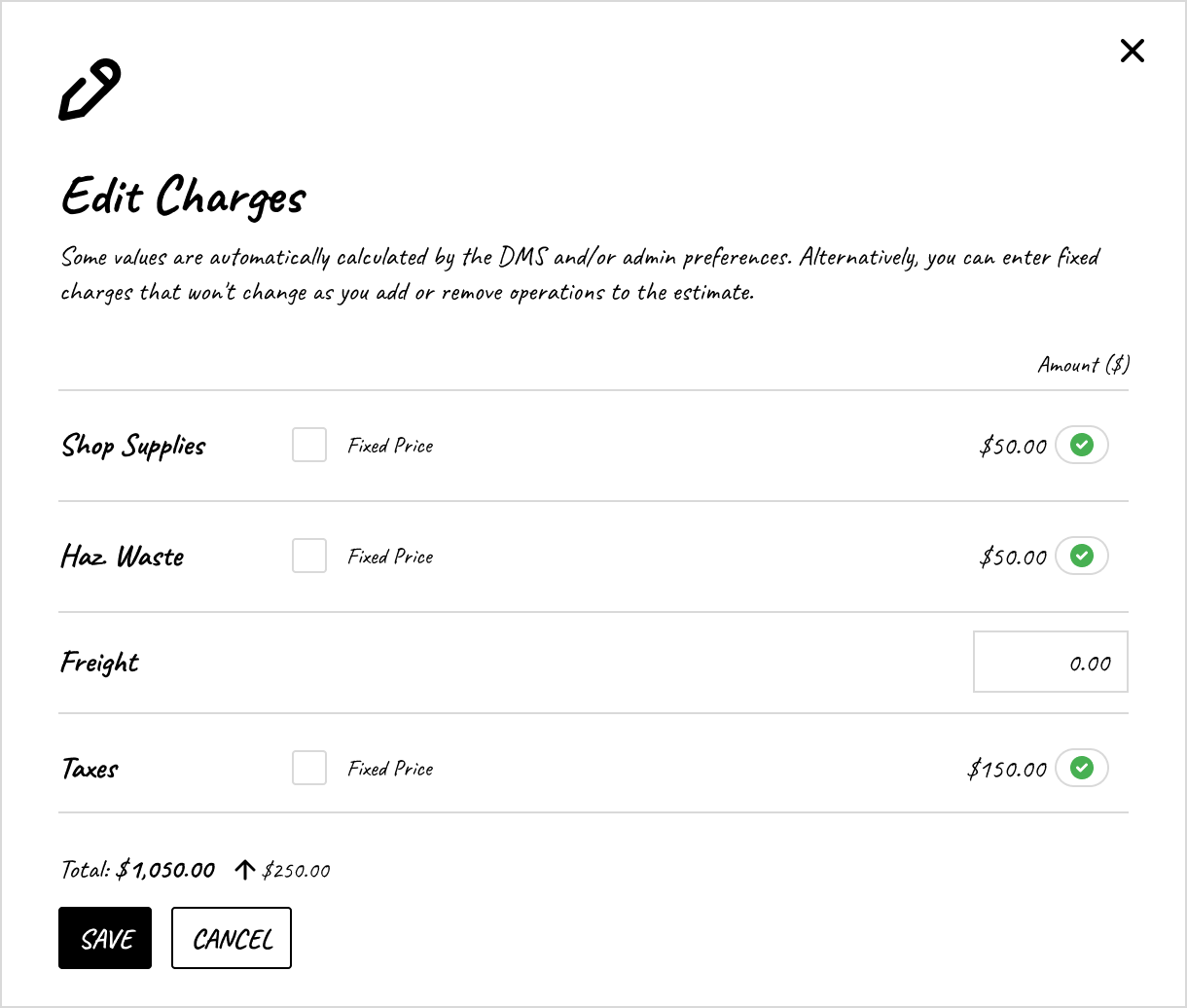
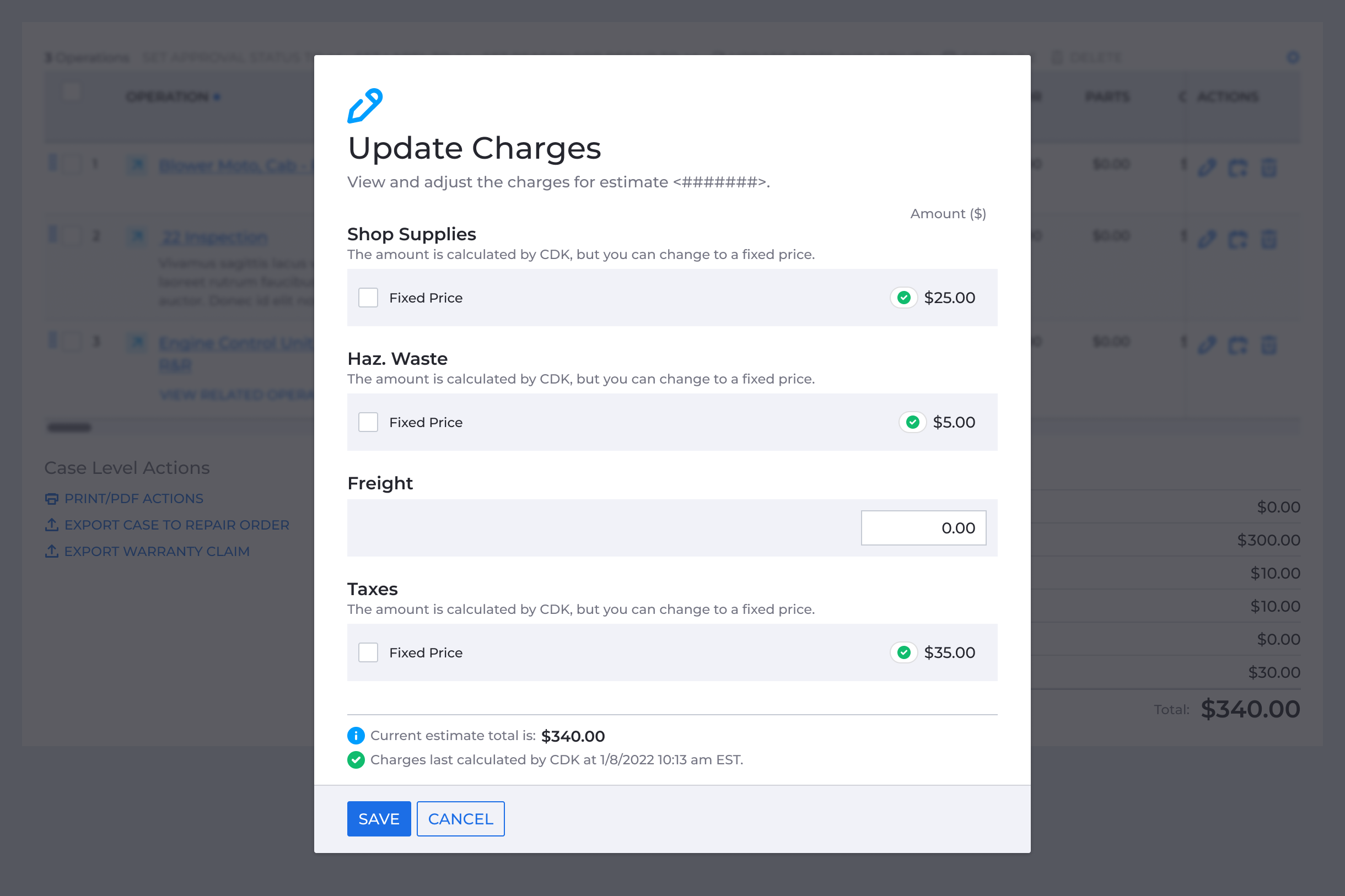
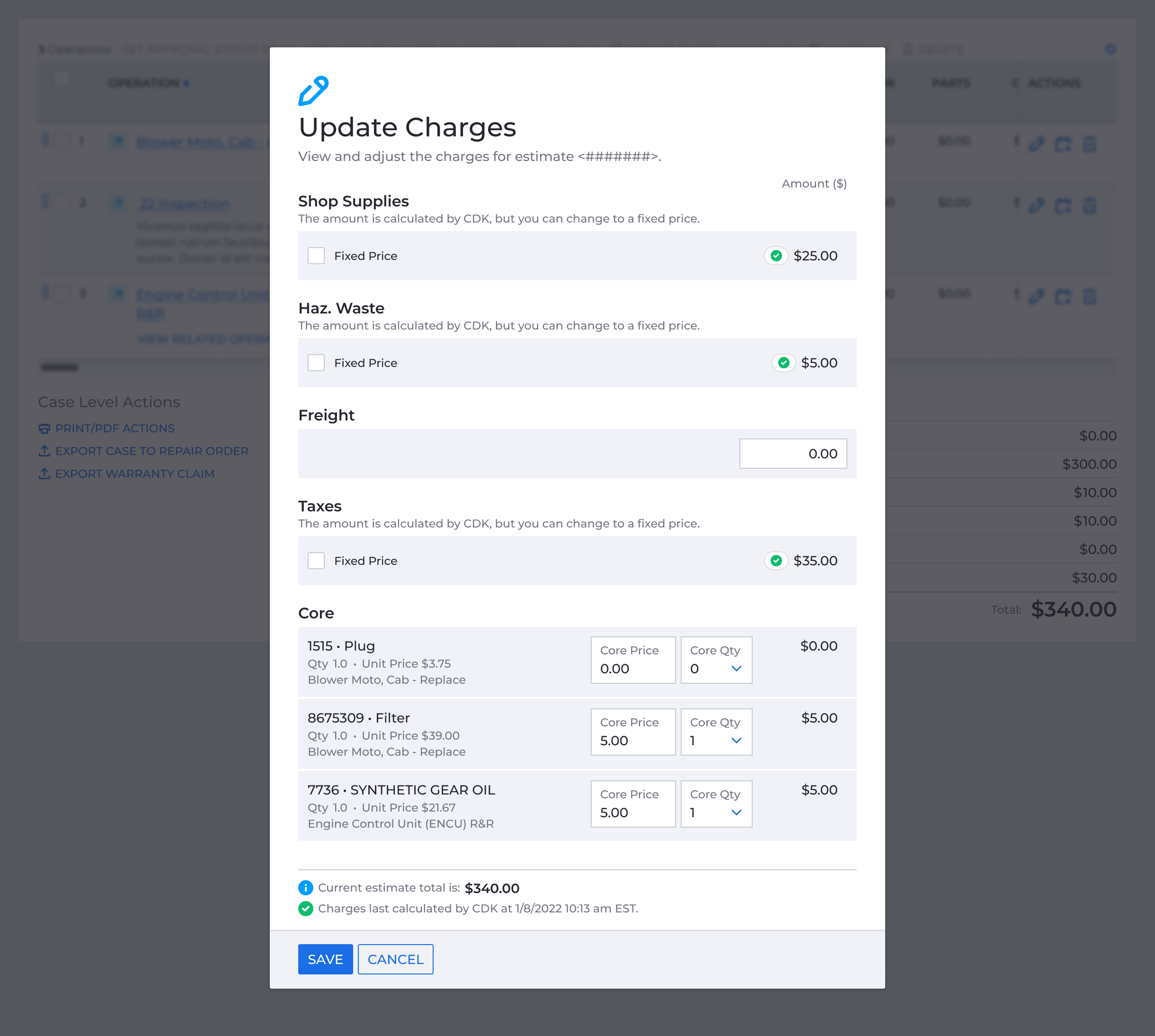
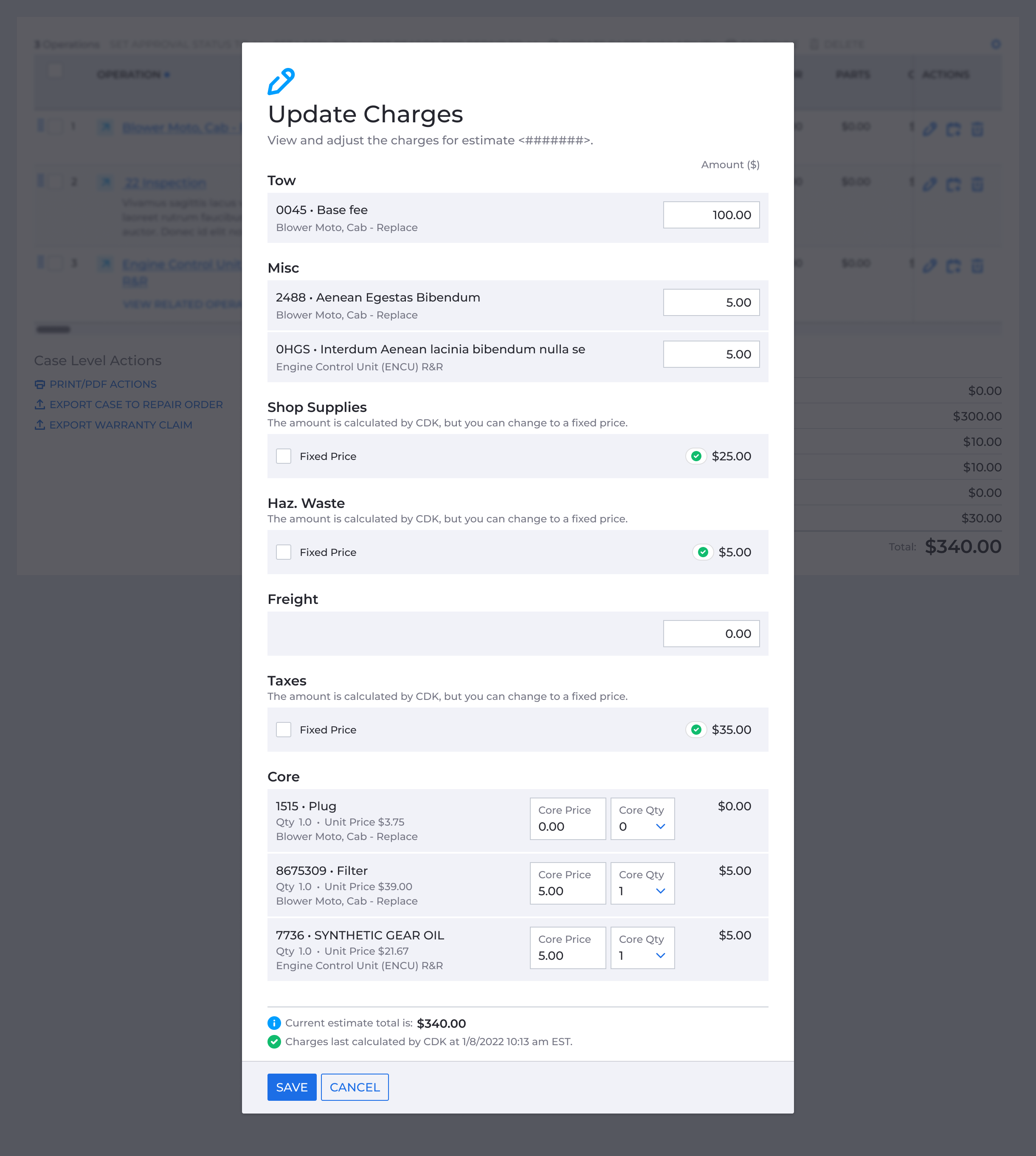
Not every charge type worked the same way, but I narrowed it down to four interaction patterns. Shop supplies, hazardous waste, and taxes used a calculated/fixed price toggle. Freight was a single input. Core charges and additional charge categories were presented as a table and list respectively, with input fields for each line item and a category subtotal.
The modal was dynamic. It displayed only the charge categories relevant to that case, in the same order as the Totals Summary table. Additional charges and core charges were scoped to operations that hadn’t been declined or deferred.
To make the modal faster to scan I dropped the accordions from the earlier concept and kept all charges visible without nesting.
Charge states
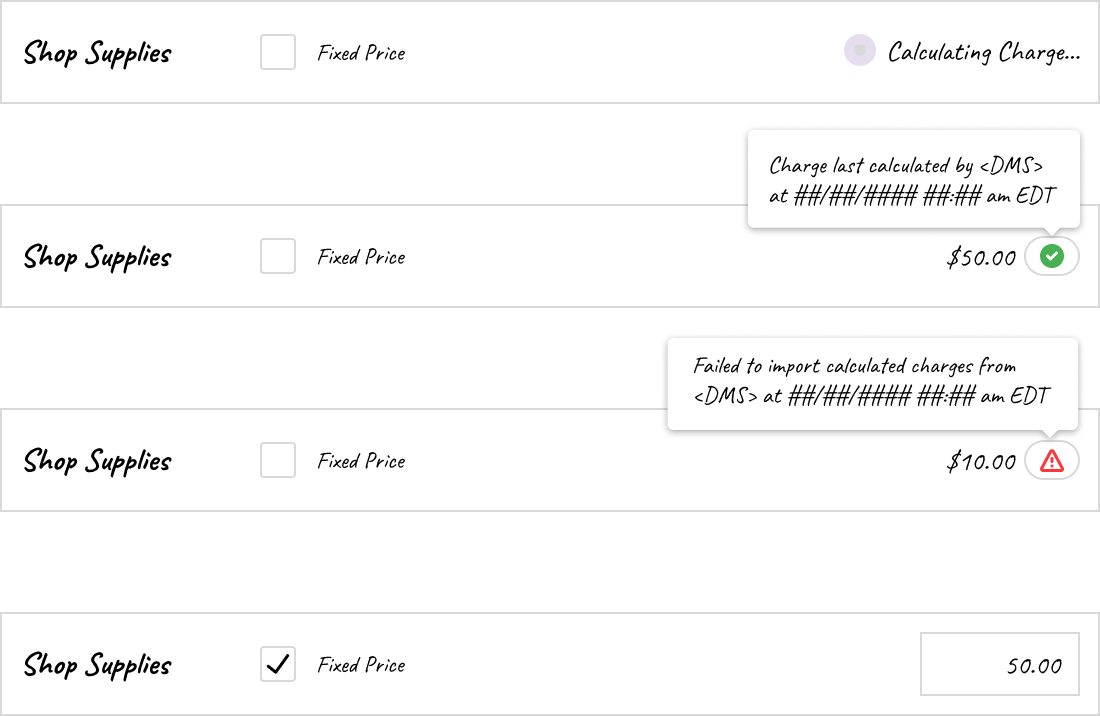
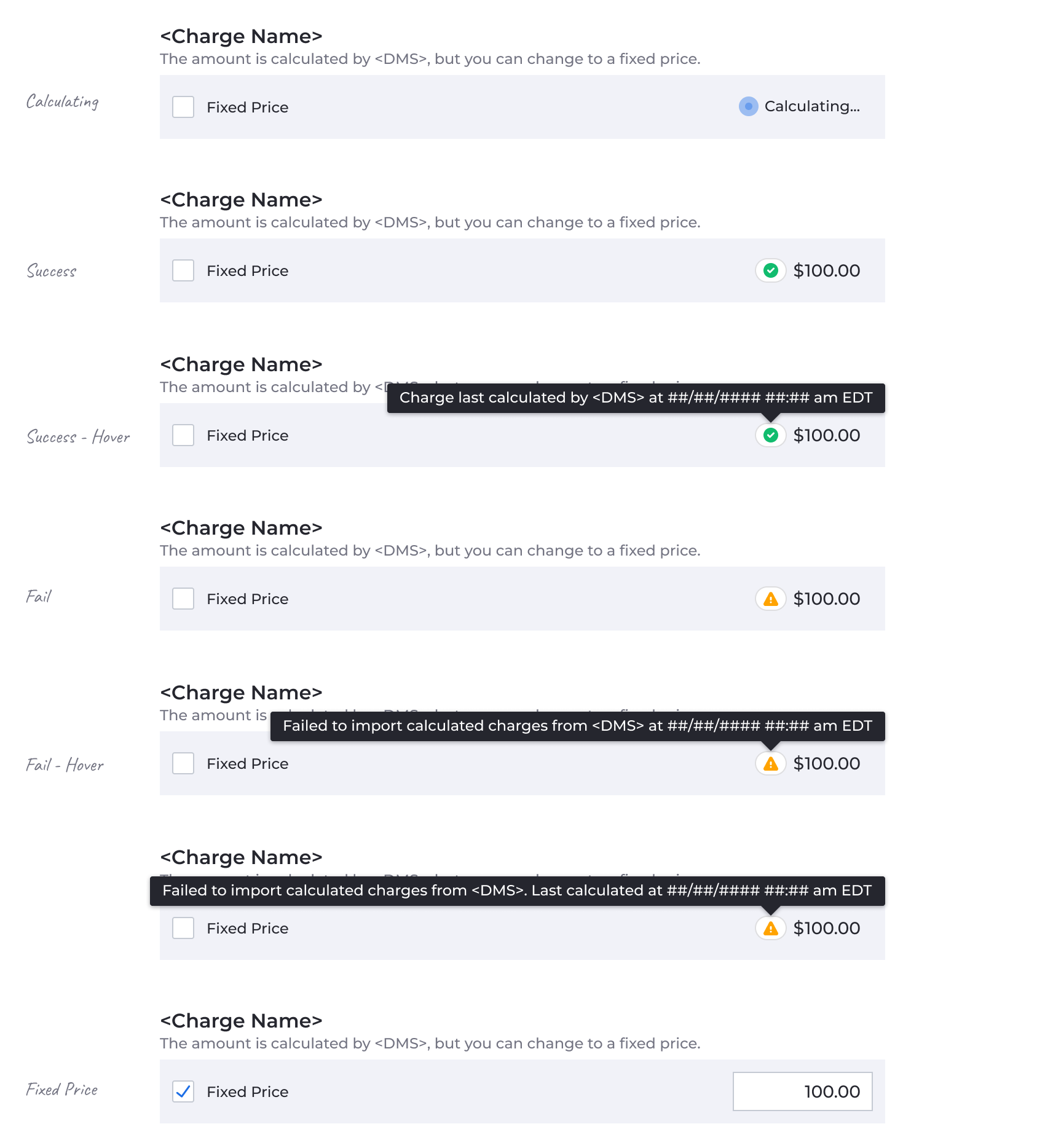
When the modal opened, it automatically called the business system and imported any available calculations. Users could review and override any value manually, whether the import succeeded or not. A checkbox controlled the fixed-price switch, making it a deliberate action rather than a silent edit. Checked, it locked in the fixed price. Unchecked, it reverted the charge back to the calculated amount.
Running total
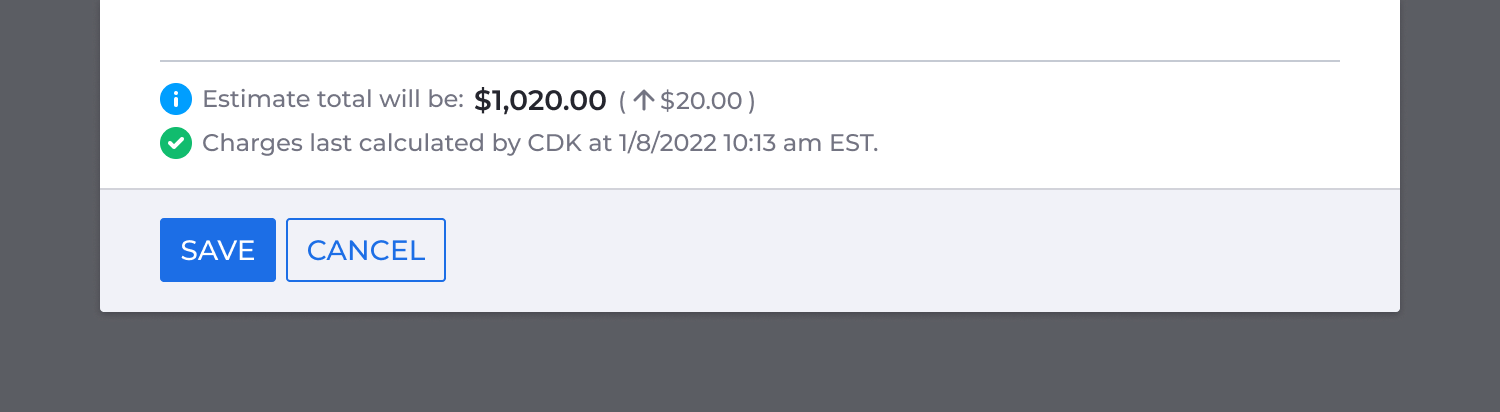
The modal included a running total so users could see the impact of their changes before saving. As values were entered or overridden, the total updated in place, with no need to close the modal and check elsewhere.

Testing the direction
I turned the wireframe into a clickable prototype and ran it through an internal feedback round. The feedback pointed toward simplification, and I took those notes into high fidelity.
The Final Design
One entry point
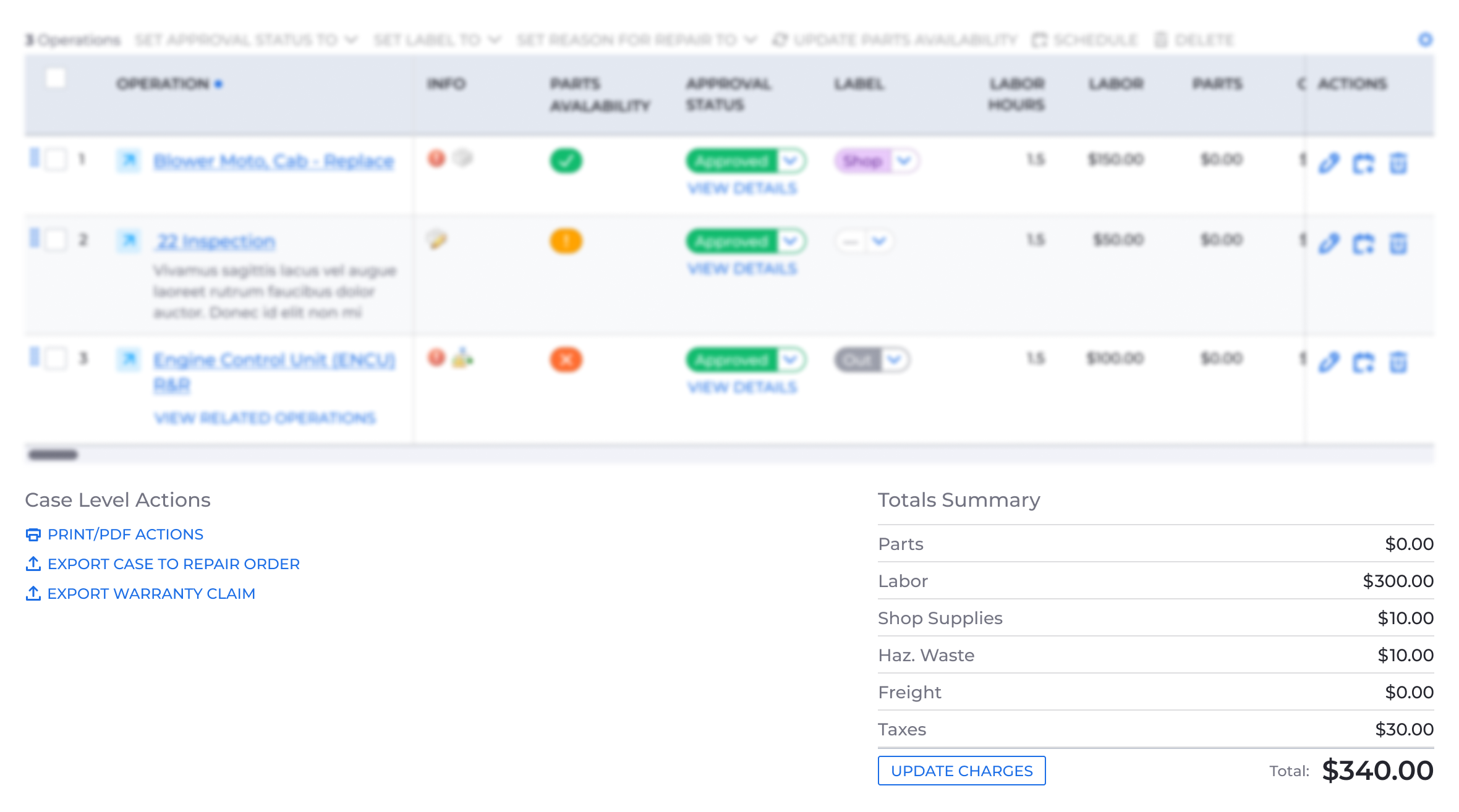
I reskinned the totals summary and case-level actions with KeyDS, as originally requested. The many charge controls became a single Update Charges entry point, which made this area simpler and easier to scan.
Inside the modal
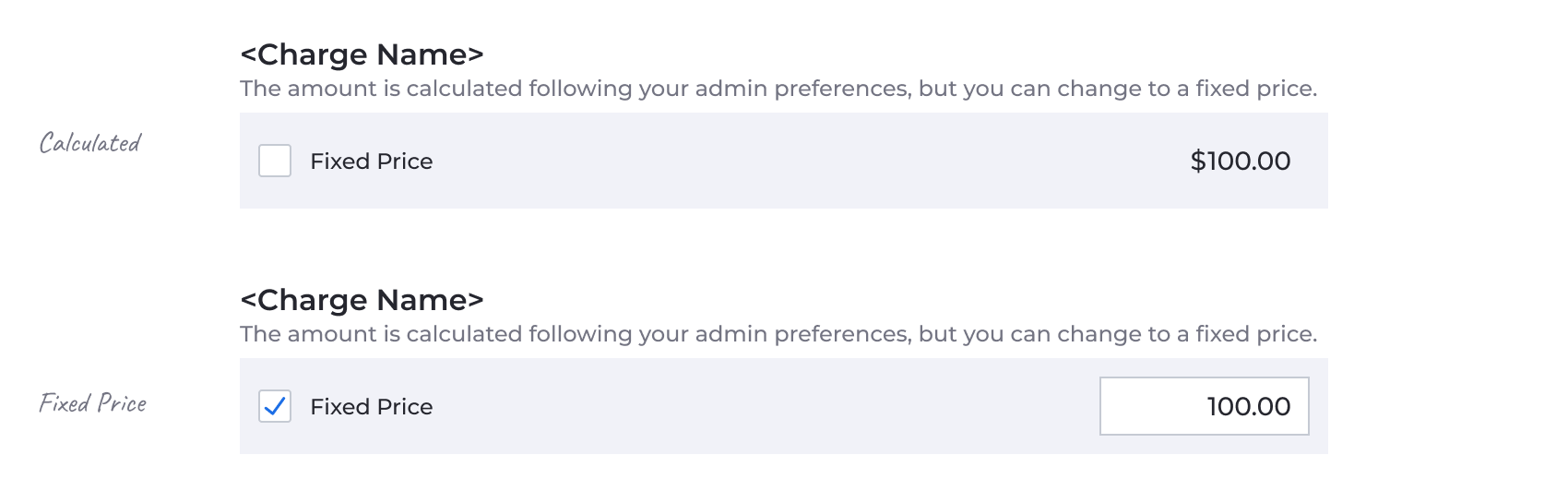
In the wireframe, I used a two-column layout with the charge name on the left and the controls on the right. In high fidelity it got too busy, so I switched to a stacked list with a grey background per category and moved the source description from the modal header to sit directly below each one.
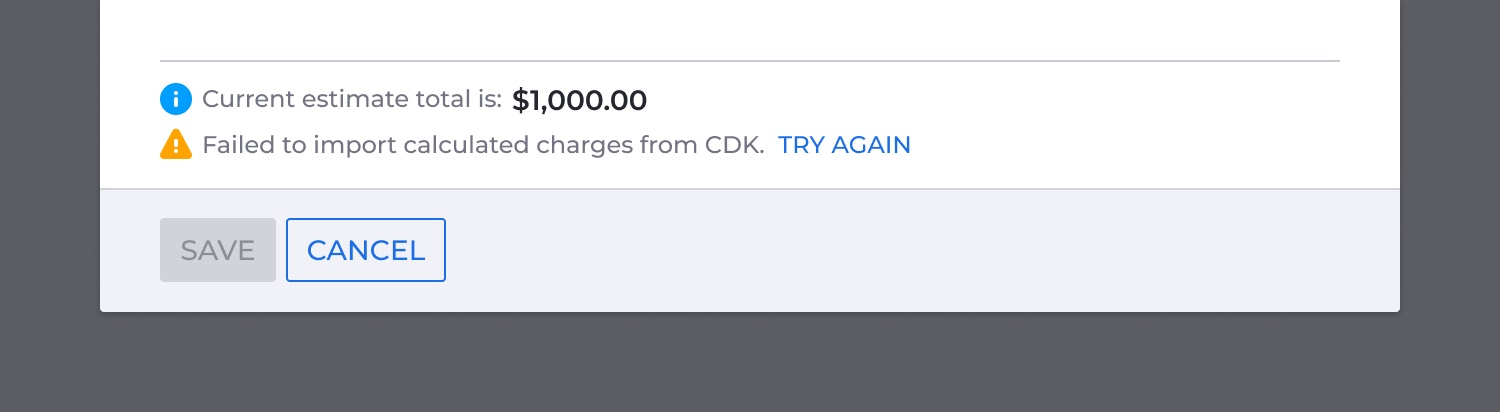
I designed distinct states for business system calculated charges and admin-configured charges, covering processing, success, and error conditions.
Core charges, which had been a table in the wireframe, became a list to match the pattern used for additional charge categories.
Running total
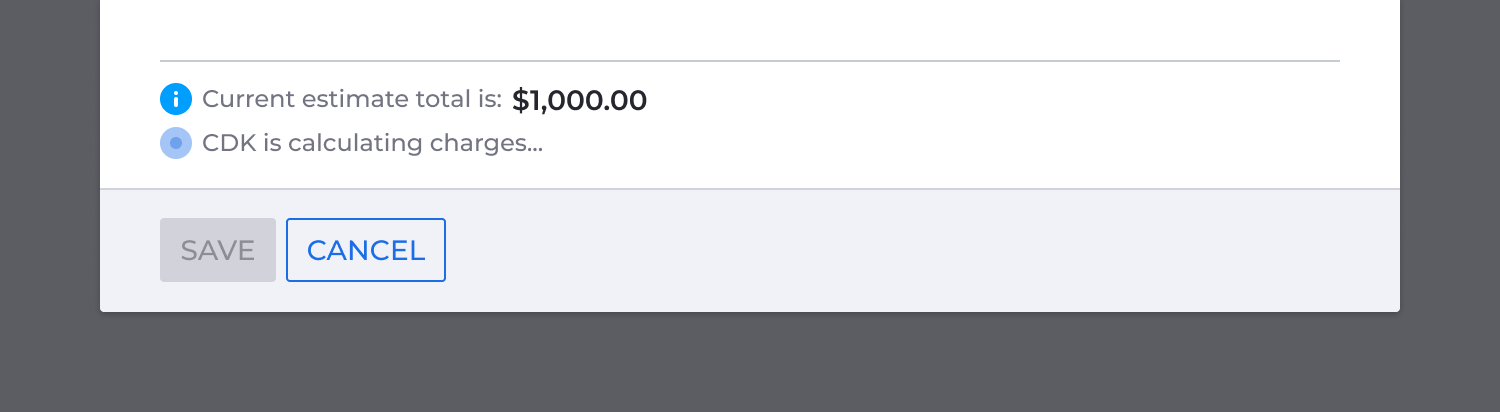
I added a business system calculating status to the sticky footer. Since charges calculated independently and the modal could scroll, users needed to know the system was still working without having to scroll up to check individual charge states.
Validating the Design
I worked with a researcher to validate the new flow with a clickable prototype in moderated usability testing, covering two core tasks: calculating charges and manually overriding a shop supply charge to a fixed amount. Users completed both, understood where charge values came from, and handled calculation failures by overriding charges manually.
Sign-off and Implementation
Once the design was validated, I brought it to engineering with a full spec: modal states, charge visibility rules, calculation states, save-button behavior, fixed-price interactions, failure cases, and edge cases. The documentation made clear the redesign was organizing complexity that already existed, not adding to it. That kept the scope manageable, kept the PM committed, and kept me involved through development, answering questions and reviewing builds before launch.
Impact
The project unblocked the Operations Table migration. No business rules changed. Existing logic was packaged in KeyDS, which kept the engineering scope contained. The mapping, design work, and stakeholder alignment happened upfront, so by the time engineering picked it up, most of the hard work was done.
For service advisors, charges went from scattered across multiple pages and detail views to a single entry point. Additional charge categories could be reviewed and edited from the case page for the first time. Charge sources, whether imported from the business system, calculated automatically, or entered manually, were labeled at the point of decision. Switching a charge to a fixed price was a visible, intentional action rather than a silent edit.
Looking back
This project went further than I expected it to, which doesn’t always happen when scope expands opportunistically. This time it did.
What I’d do differently: find a way to collect feedback after launch rather than relying solely on the usability study. The study gave us enough confidence to ship, but I left not long after release. I’m assuming it landed well, but I don’t know for certain.
Other Case Studies